Stepwise Approvals for Jira

Nothing moves to Done without a sign-off

Releases, changes, purchases, access: give every work item that needs a yes a clear approval. Named reviewers, steps and quorum, a workflow gate that holds the transition, and JQL to find what is waiting.

  • Runs entirely on Atlassian
  • Workflow validator included
  • Approval log for auditors
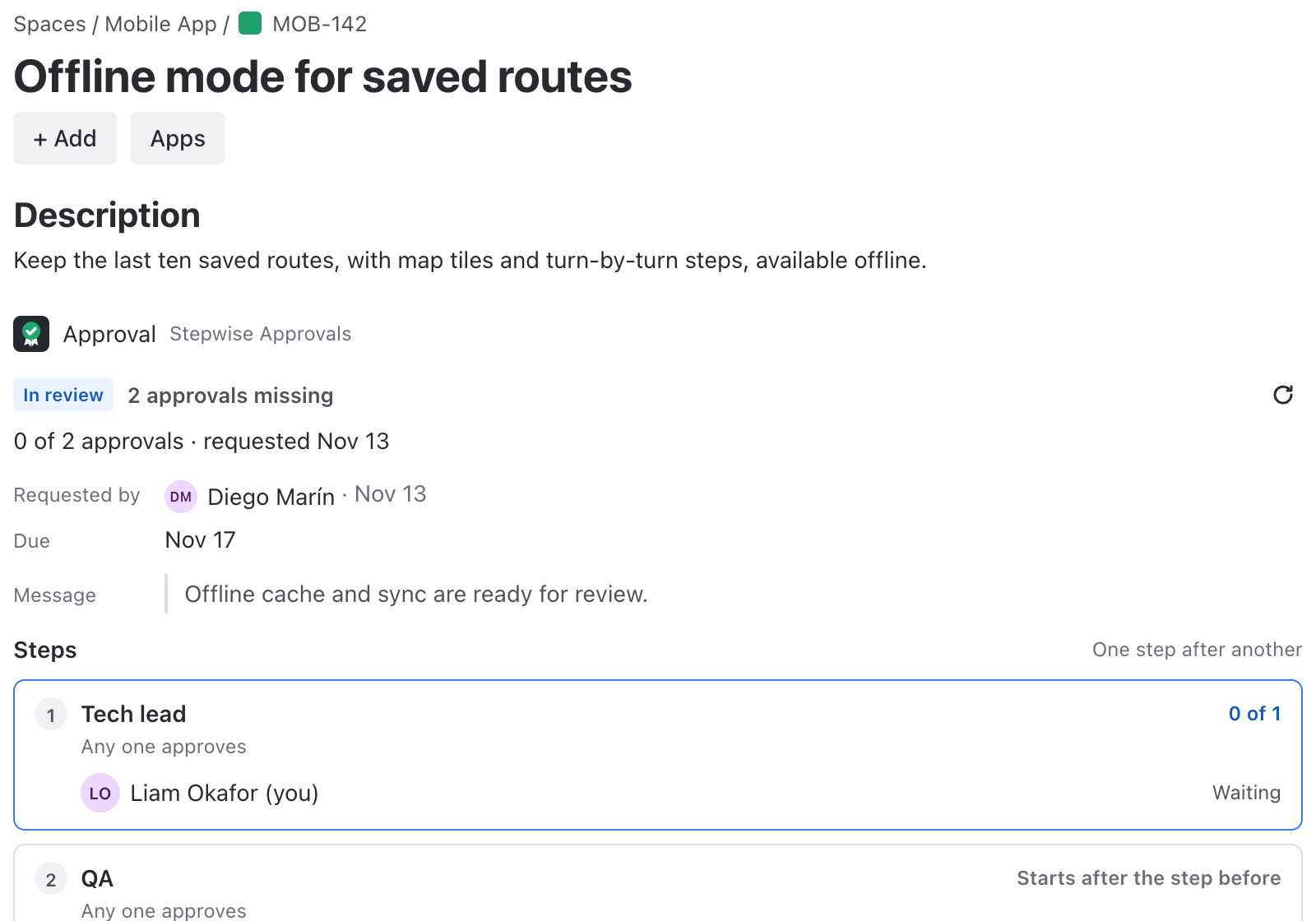
A Jira work item with the Approval panel: In review, 2 approvals missing, step 1 Tech lead waiting for its reviewer, step 2 QA reviewers starting after the step before.

Jira can move work forward. Stepwise Approvals makes sure the right people said yes first.

Approval inside the work item

The panel shows the steps, who has signed and who is still to answer. History stays with the work item.

A gate in the workflow

Add one validator to a transition and it passes only when the approval is complete. No more “we forgot to ask”.

Find what is waiting

JQL fields list every work item in review and every one that still needs approvals.

What changes for your team

Seven things your team gets from day one, and one you never have to think about.

Reviewers, steps and quorum

Name people or whole groups, put steps in sequence or in parallel, and decide how many have to agree.

  • Reviewers can be people or groups
  • Up to five steps, in sequence or in parallel
  • Quorum per step: any one, N of them, or all
  • Approve or request changes, with a comment
  • The person who requested cannot approve their own request
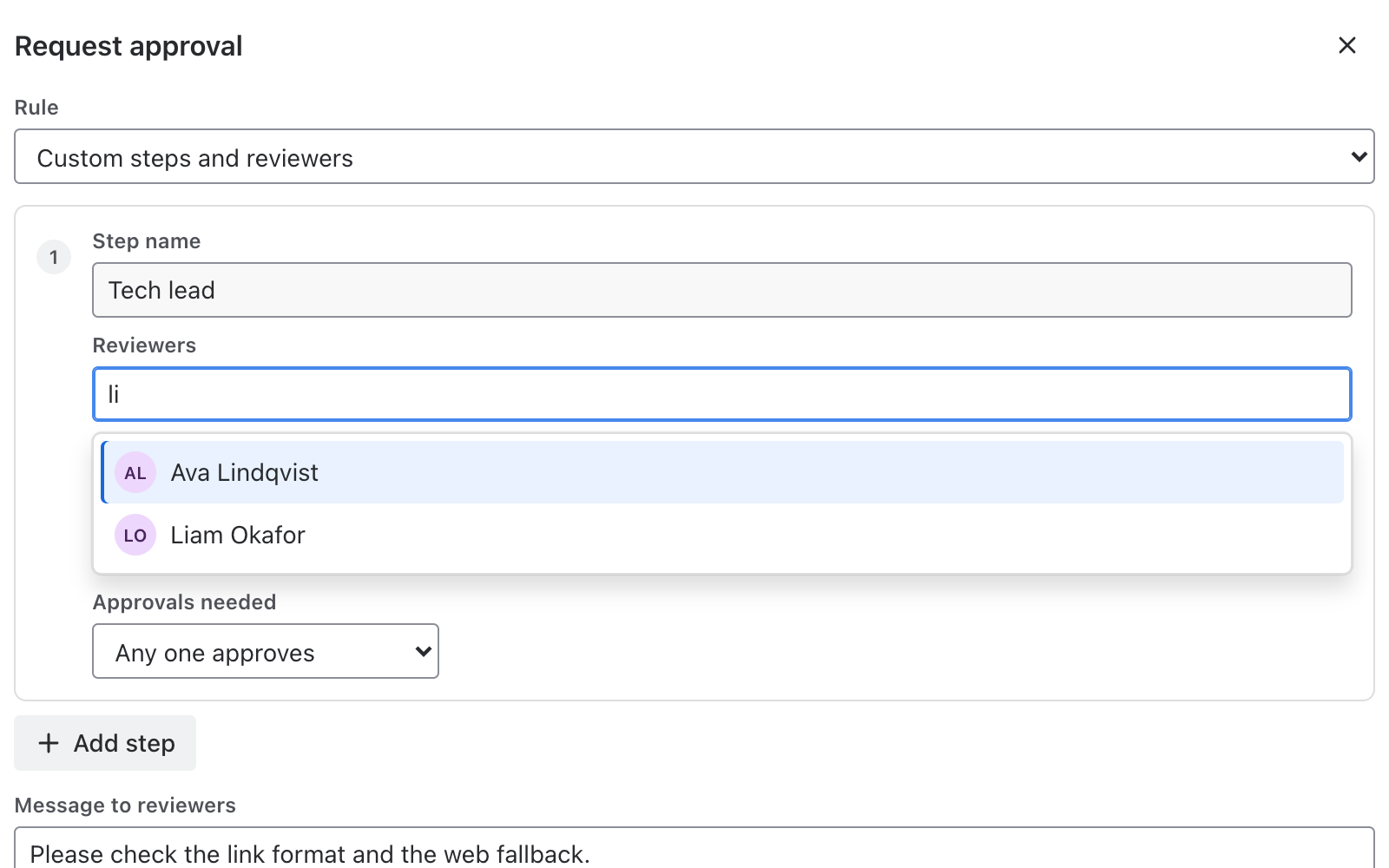
The Request approval form in a work item: a step named Tech lead, a reviewer search that lists two people, and the choice of how many approvals are needed.

No sign-off, no transition

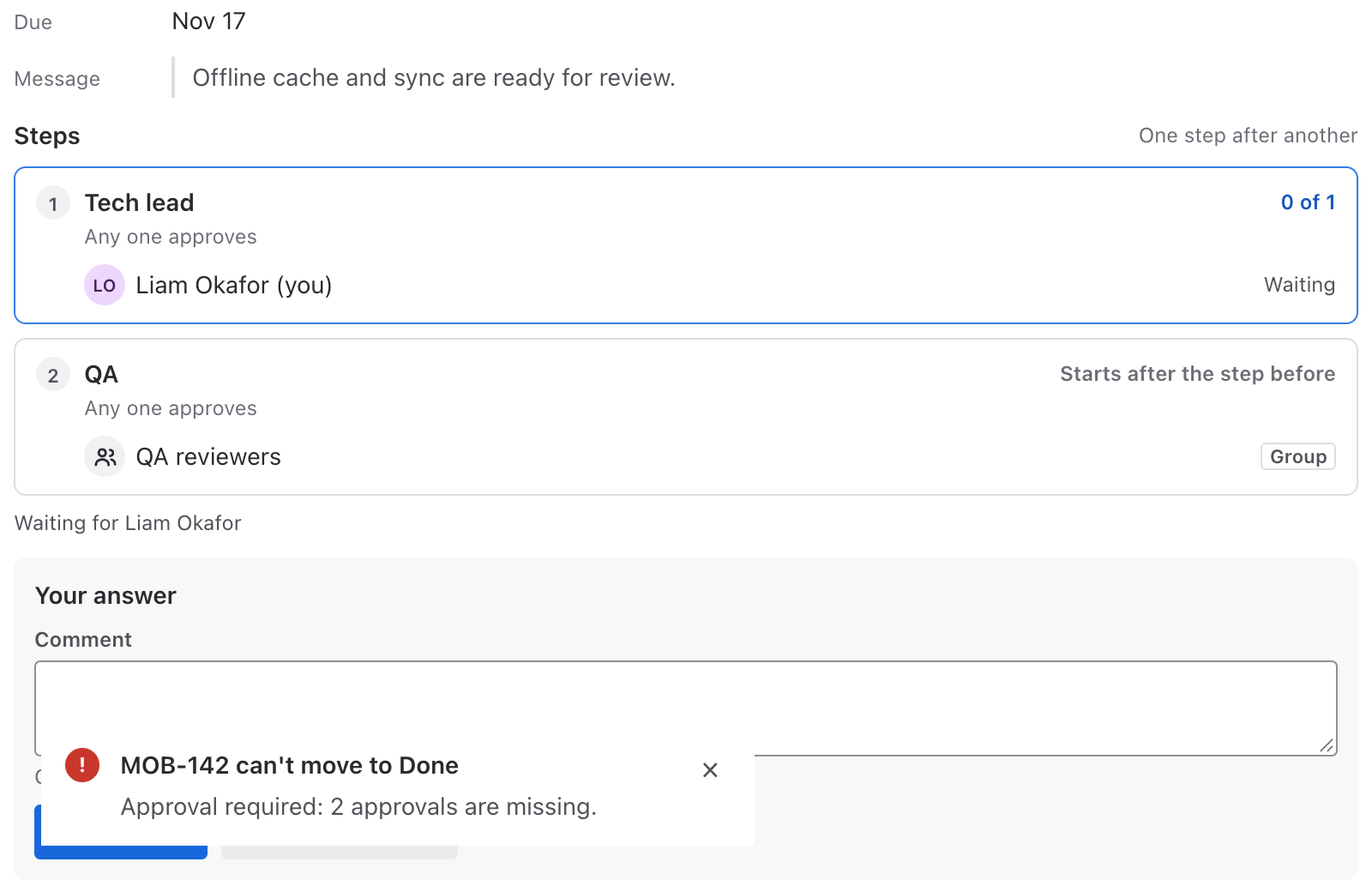
Put the validator “Stepwise: approval is complete” on the transition you want to guard. It passes only when the approval is complete.

  • Open the transition’s validators, add Stepwise: approval is complete, publish
  • The message says what is missing: approvals, requested changes, or no request yet
  • Guard Done, Release, Approved by Finance, or any other step of your workflow
A work item with two approval steps and the message MOB-142 can’t move to Done: Approval required, 2 approvals are missing.

Approvals that start themselves

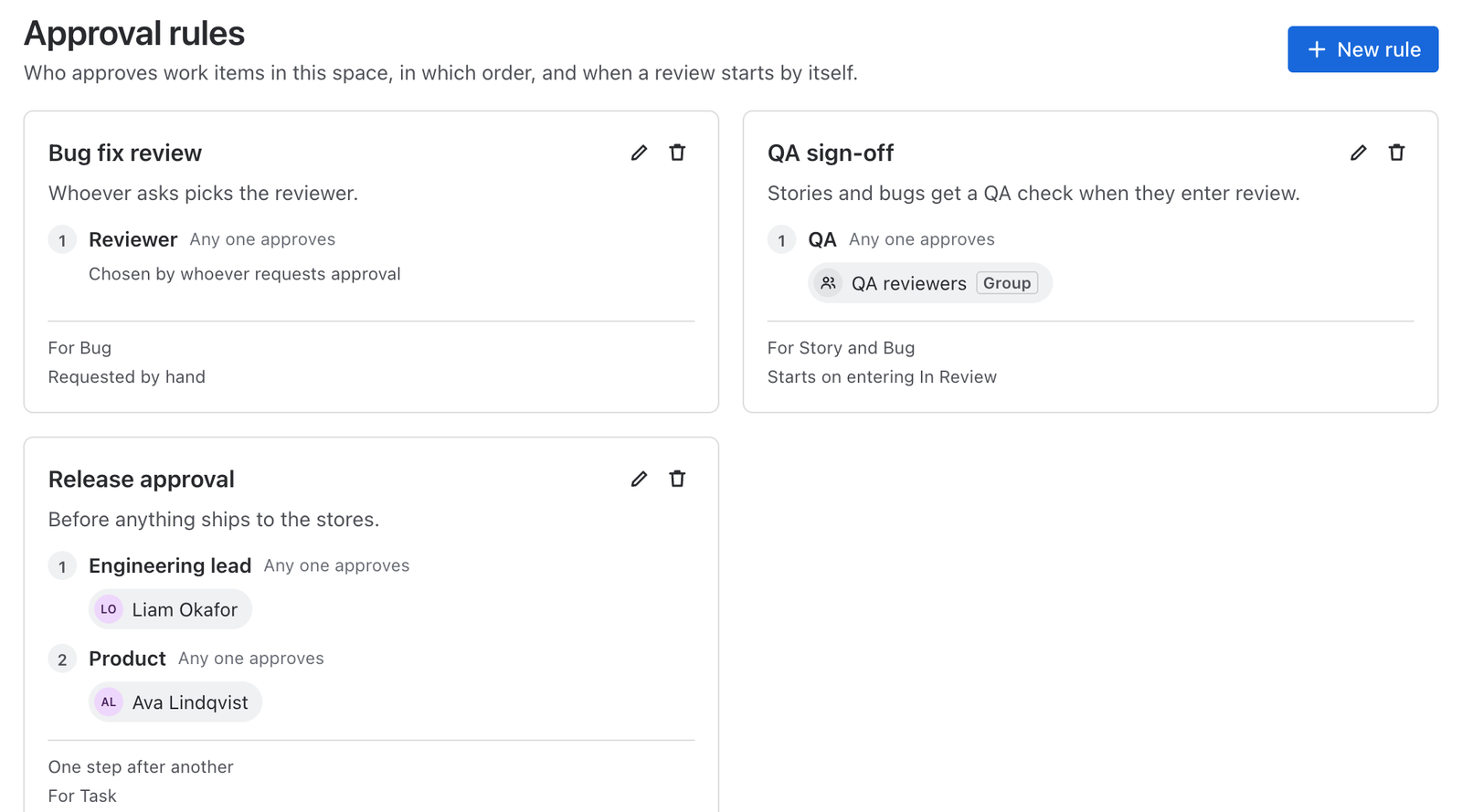
Pick work types and statuses once. An approval starts when a matching work item is created, when it enters a status, or both.

  • Up to 30 rules per space, each with its own steps, order and quorum
  • Work types left empty mean all work types
  • Several rules match? The first by name starts, so there is one approval at a time
  • Reviewers are notified by email through Jira
Approval rules of a space: Bug fix review, QA sign-off that starts when a story or bug enters In Review, and Release approval with two steps, plus three ready-made presets.

Find it with JQL

Two JQL fields hold the state of every approval. Use them in filters, boards, dashboards and automation. They carry no names.

  • Everything in review: stepwiseApproval = "pending"
  • Everything that still needs approvals: stepwiseApprovalsMissing > 0
  • Combine with space, work type or status as usual

See every work item of the space

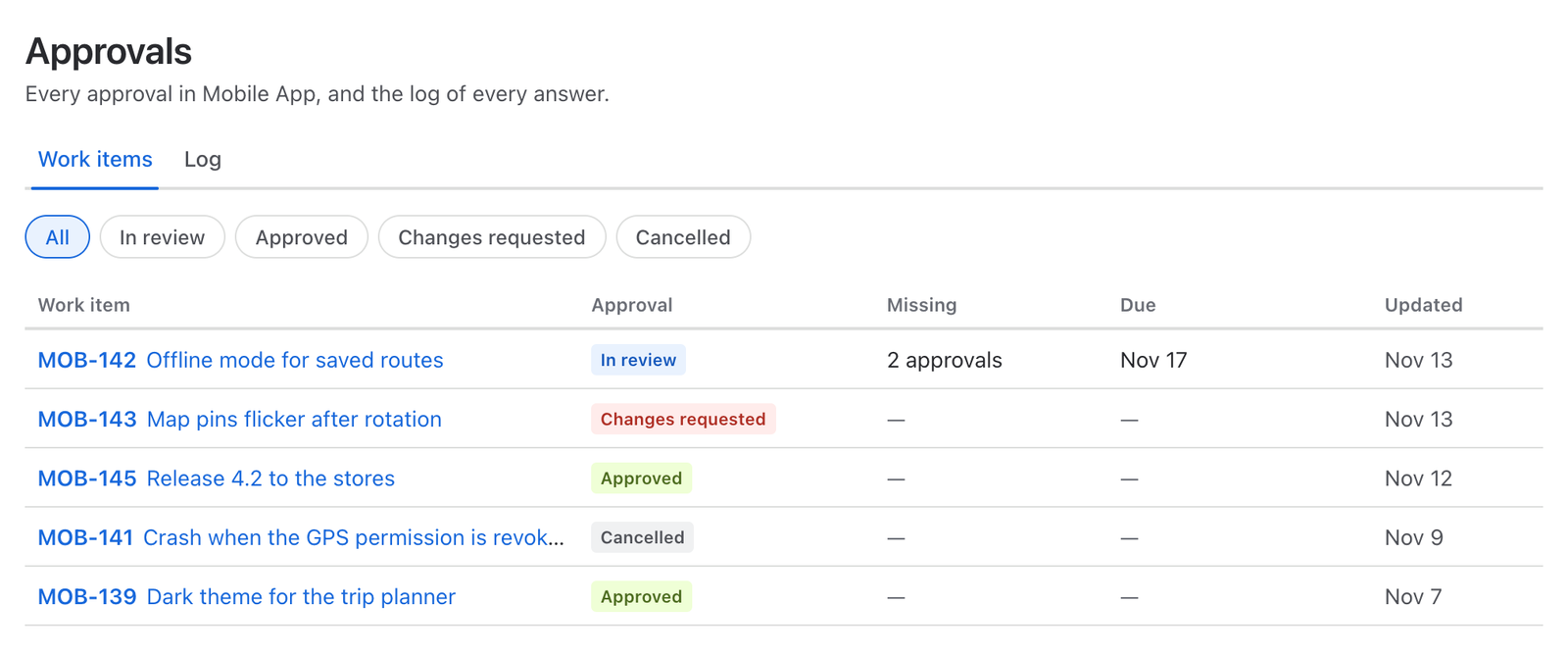
The Approvals page of each space lists work items by state, how many approvals are missing, and the log with every event.

  • Everyone who can see the space can open it
  • The Log tab shows request, votes, decisions and rules, newest first
  • Reminders on demand: Remind reviewers sends an email through Jira
The Approvals page of a space: filters for In review, Approved, Changes requested and Cancelled, above a table of work items with their approval state and missing approvals.

Roll out in four steps

Panel, rule, gate, search. Each step is useful on its own.

  1. Open the Approval panel

    In any work item, the Approval panel shows the state and lets you request one.

  2. Add the rule or request by hand

    A space admin picks work types and statuses that start an approval, or you request it from the panel.

  3. Guard the transition

    A workflow admin adds the validator “Stepwise: approval is complete” to the transitions that need a sign-off.

  4. Search and report

    Use stepwiseApproval and stepwiseApprovalsMissing in JQL, and the Approvals page of the space.

Runs entirely on Atlassian

Your data stays in Atlassian

Approvals are kept in Atlassian-hosted app storage and nothing is sent to any other server. The app stores the account IDs of requesters and reviewers, so it knows who signed, and never names or emails. The only thing written to a work item is the approval state and two counters for search.

No people in work item properties

Only the state, the number of missing approvals and the cycle number are written to the work item, so JQL works and nobody’s name travels with it.

No external servers

No copies elsewhere, no analytics, no third parties.

Jira permissions apply

Reviewers must be able to see the work item. The gate reads the approval from the app’s own storage.

Account IDs only, reported to Atlassian

IDs are reported to Atlassian every week and erased when an account is closed. The actions stay in the log as “Former user”.

Premium

For teams that have to prove what was approved, by whom and when.

Tamper-evident log

Every entry is chained to the one before it, so any edit or deletion shows up.

Verify with one click

Verify the log of a space: either “Verified, no changes”, or the first entry that does not match.

Audit report export

Download the log of a space for a period as CSV, or the full report of one work item.

Questions and answers

How is this different from the approvals built into Jira?

Stepwise Approvals adds rules by work type and status, steps in sequence or in parallel, quorum, a workflow validator that blocks the transition until approved, JQL fields and a tamper-evident approval log.

How do I block a transition until approval?

Add the validator “Stepwise: approval is complete” to the transition in the workflow editor and publish. The docs walk through it.

Who can approve a work item?

The reviewers named in the step, people or groups, as long as they can see the work item. The person who requested the approval cannot approve their own request.

Can approvals start on their own?

Yes. A rule starts an approval when a work item of the chosen work types is created, when it enters the chosen statuses, or both.

Can I require several approvers?

Yes. Use up to five steps in sequence or in parallel, with a quorum for each step: any one, N of them, or all.

How do I find work items waiting for approval?

Use stepwiseApproval = "pending" for work items in review, or stepwiseApprovalsMissing > 0 for those that still need approvals.

How are reviewers notified?

By an email notification through Jira when an approval is requested, and again whenever you press Remind reviewers.

Where is the data stored?

In Atlassian-hosted app storage. Nothing leaves Atlassian. See the security page.

Does it work with the Confluence version?

They are separate apps with the same approval experience. Each is installed on its own. See Stepwise Approvals for Confluence.

Does it support dark theme?

Yes, it follows each person’s Jira theme automatically.

Also for Confluence

The same sign-off on every Confluence page

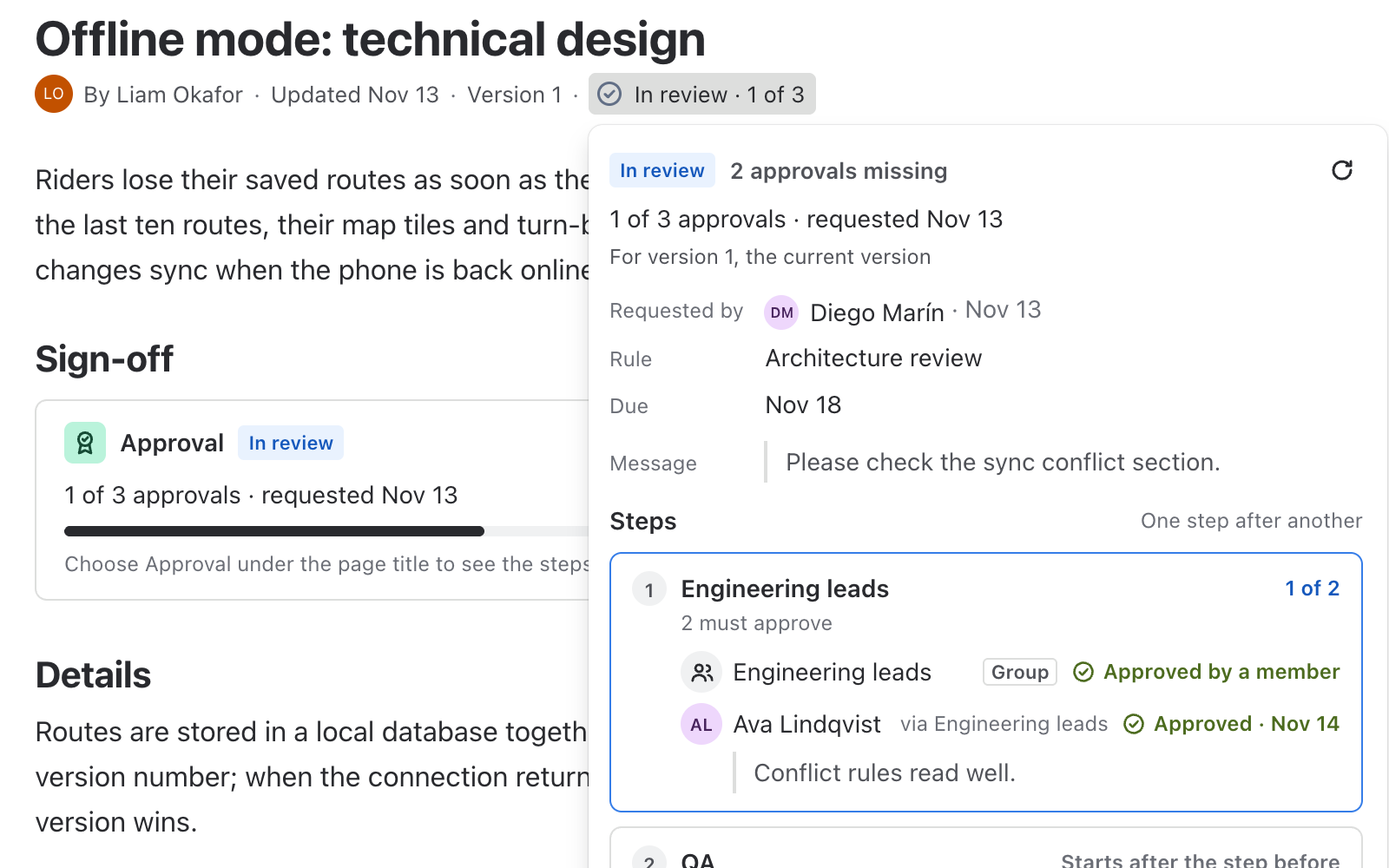
Stepwise Approvals for Confluence brings reviewers, quorum, version-bound sign-off and re-review to policies, specs and contracts. It is a separate app.

See Stepwise Approvals for Confluence
A Confluence page with the badge In review, 1 of 3 under the title and the approval popup open with its steps and reviewers.

Give every important work item a clear yes

Install it, add one rule and one validator, and let the workflow ask for the sign-off.