Stepwise Risk Register for Jira

A live risk register inside Jira

A register in a spreadsheet is out of date the day it is saved. Here every risk is a Jira work item: score it by probability and impact, link the measures, set a review date, and the risk matrix shows where you stand right now.

  • Risk matrix before and after measures
  • Measures are work items
  • Built on Forge, no external servers
The Risk register page of a Jira space: five counts, 11 open risks, 3 at the highest levels, 2 not assessed, 3 reviews overdue and 5 without measures, and under them the risk matrix after measures. The count Highest levels and the three cells that hold those risks are ringed, and a large number says 3 of 11.

A register nobody opens does not manage risk. Stepwise Risk Register keeps it where the work is, so it is current without anyone updating a file.

Every risk on one live matrix

The matrix, the top risks and the counts change the moment someone updates a risk.

See what your measures achieve

Measures are work items with a status, and risk before and after measures stand side by side.

See every overdue risk review

Each risk has a review date. The overdue ones are counted, listed and one click away.

What changes for your team

Eight things you stop doing by hand.

Score a risk in two clicks

Scoring risks by gut feeling? Pick the probability, pick the impact. The score and the level appear at once, in words and colour, from the same scale for everyone.

  • A risk is a work item, so owners, workflow, comments and permissions are the ones you already use
  • Strategy (avoid, reduce, transfer, accept), category and review date in the same panel
  • Readable in light and dark theme: a level is always a word as well as a colour
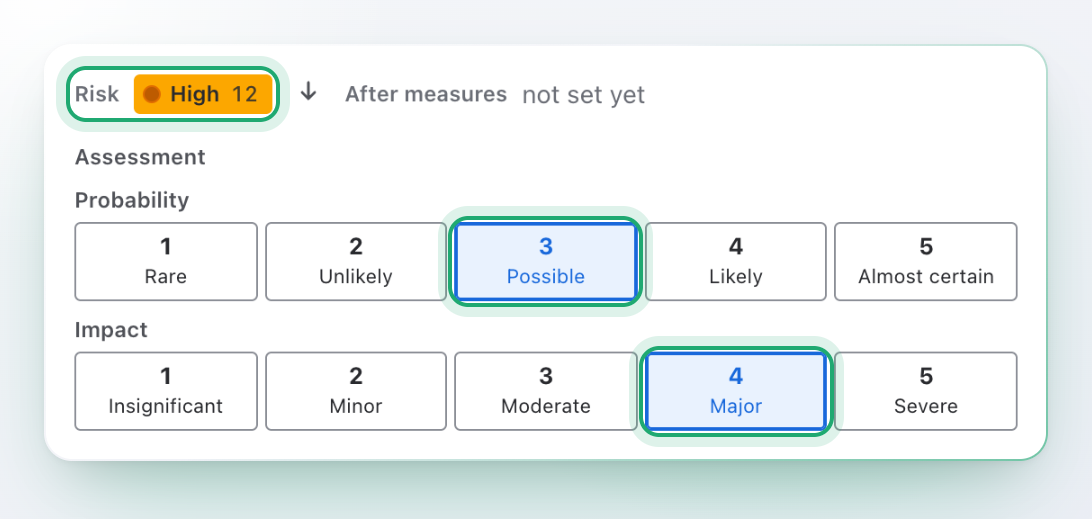
The Risk panel of a work item. Probability 3 Possible and impact 4 Major are picked, and the line above them says Risk High 12. The two picked steps and the level are ringed.

See what your measures achieve

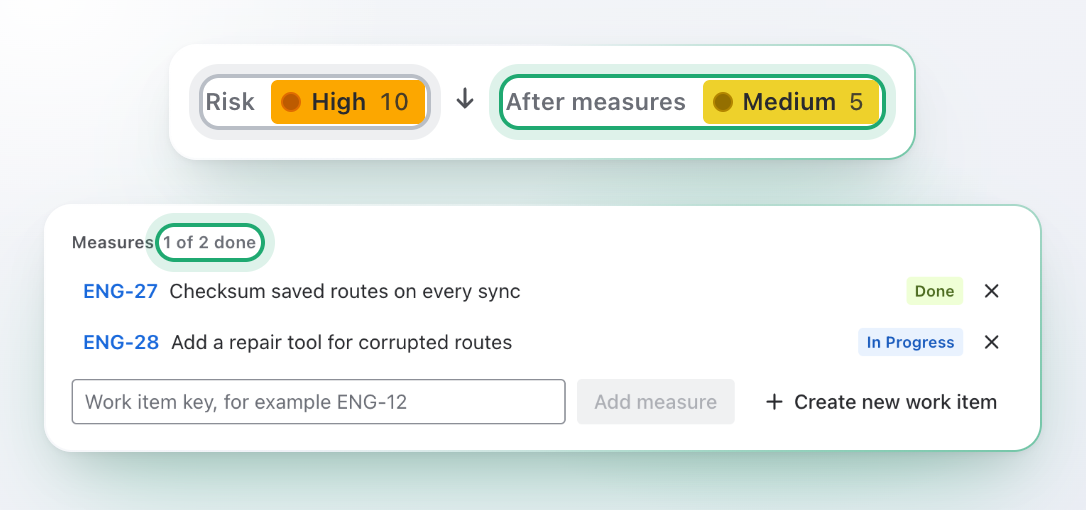
Measures agreed in a workshop, then forgotten? Link them to the risk as work items, then assess the risk again once they work. Inherent and residual risk stand side by side.

  • Add a measure by its key, or create a new work item from the risk
  • Key, title and status of each measure, and how many are done
  • Moving a work item to another space does not break the link
One risk before and after its measures: Risk High 10, After measures Medium 5. Under it the measures of the risk, 1 of 2 done: ENG-27 is Done, ENG-28 is In Progress, and a field adds another by its key.

Risk before and after measures, for the whole register

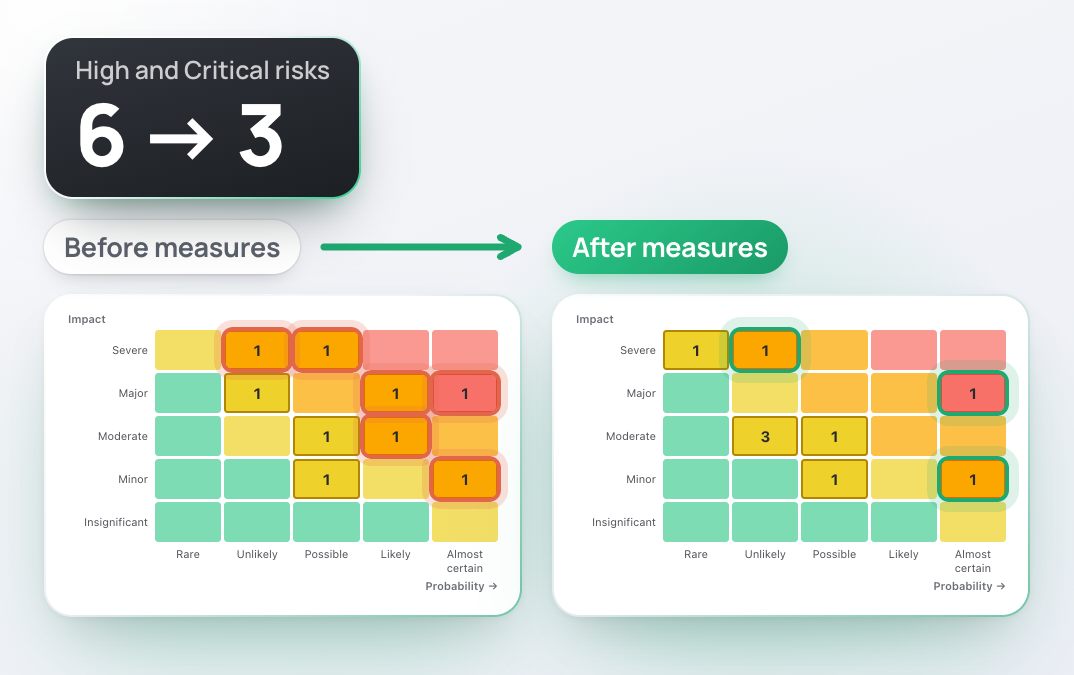
Did the measures change anything? Switch the risk matrix between before and after measures and see how many risks left the red corner.

  • One page per space: counts, risk matrix, top risks, overdue reviews and the table
  • A risk without an after-measures assessment stays where it was
  • Closed risks leave the matrix by themselves
The same risk matrix twice. Before measures 6 risks stand at High or Critical; after measures 3 do. Those cells are ringed in both, and a large number says 6 → 3.

See every overdue risk review

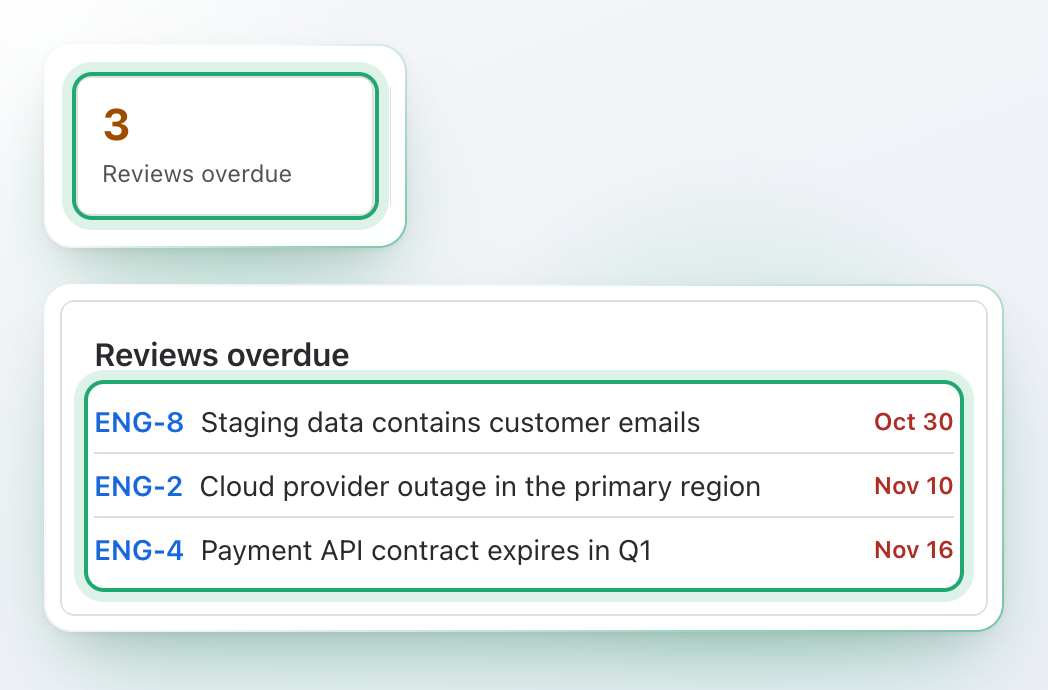
Nobody remembers when a risk was last looked at? Give each risk a review date. The register counts the overdue ones and lists them oldest first, with the date in red.

  • One click on the count filters the table to those risks
  • The risk itself says when its review was due
  • Find them anywhere in Jira with riskReviewDate < now()
The count 3 Reviews overdue, and the list under it: ENG-8 since Oct 30, ENG-2 since Nov 10 and ENG-4 since Nov 16. The count and the dates are ringed.

Click a cell, see its risks

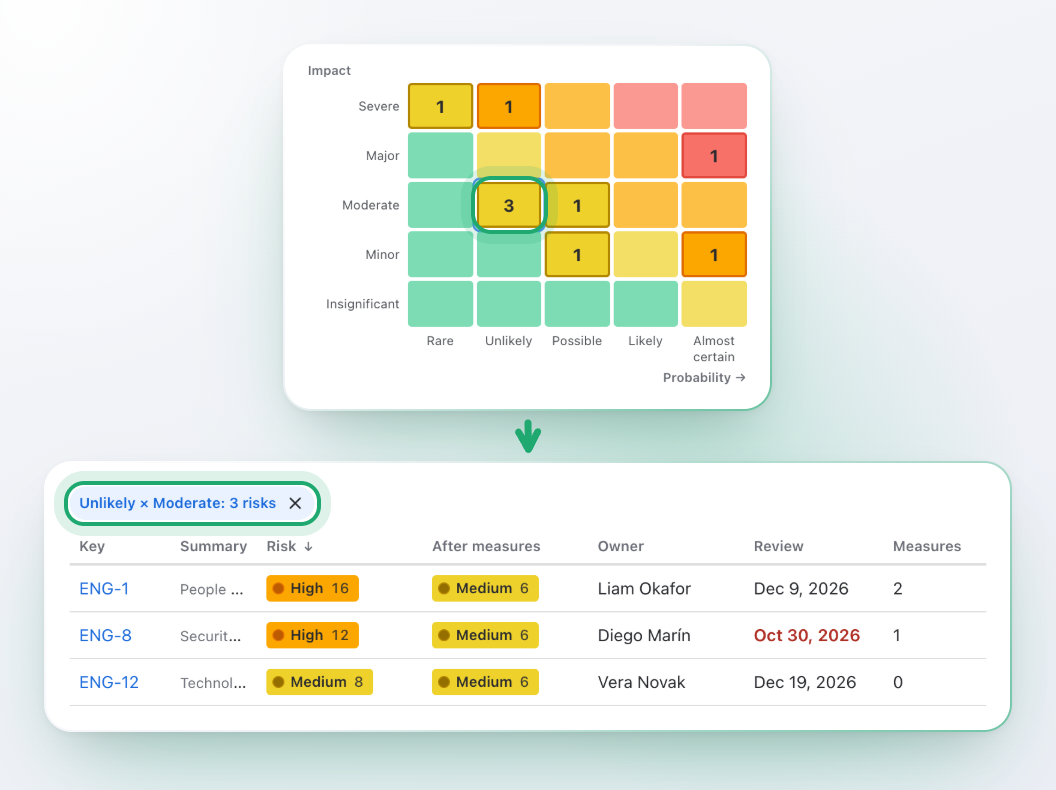
What sits in that cell of the matrix? Select it and the table lists exactly those risks, each with its owner, review date and number of measures.

  • Every cell is a button with its full name, for example “Unlikely × Moderate”
  • The counts above the matrix filter the table the same way
  • You see only the risks Jira lets you see
The risk matrix with one cell selected, and under it the table of the register filtered to that cell: Unlikely × Moderate: 3 risks, ENG-1, ENG-8 and ENG-12.

One risk model for the team

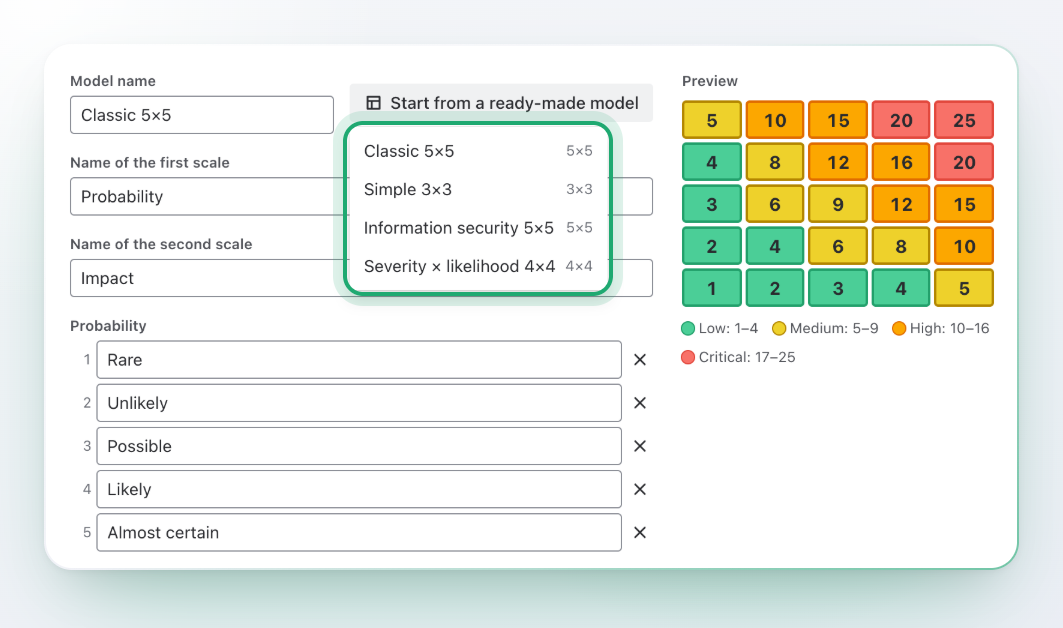
Everyone scores risk their own way? Give the space one model. Start from a ready-made one, then change what does not fit your company.

  • Classic 5×5, Simple 3×3, Information security 5×5 or Severity × likelihood 4×4
  • Scales from 3×3 up to 6×6, with your own names for every step
  • Score formula: multiply, add or take the higher of the two
  • Two to five levels, with their thresholds and colours, and a live preview of the matrix
The risk model of a space: the menu Start from a ready-made model lists 4 models, Classic 5×5, Simple 3×3, Information security 5×5 and Severity × likelihood 4×4, next to a preview of the matrix with its scores and levels.

Filter it, export it to CSV

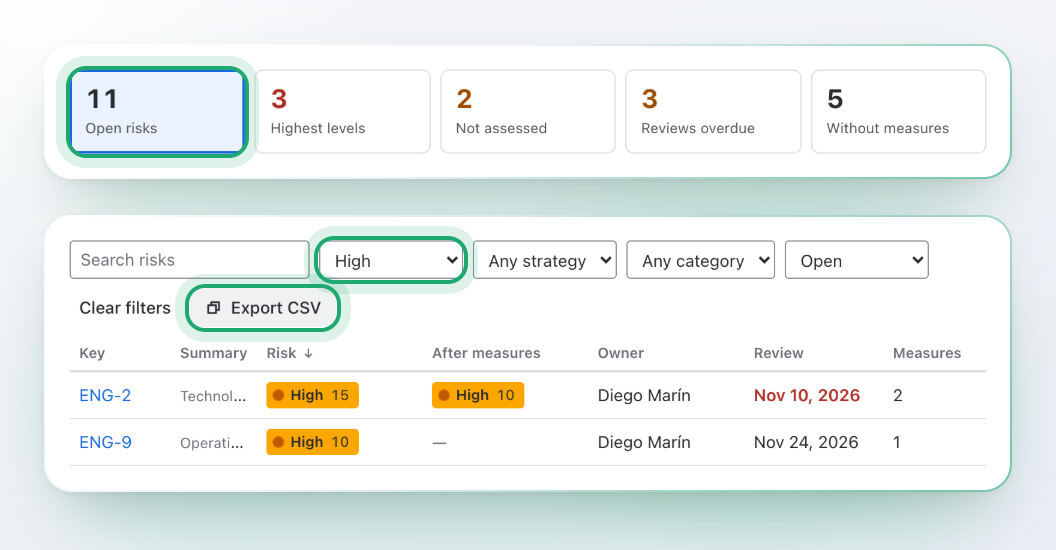
Steering meeting wants the list by Friday? Filter the register by level, strategy, category or state, sort any column and export what is on screen.

  • The CSV holds what you see, with your filters
  • Risk, risk after measures, owner, review date and number of measures in one table
  • Search by text across the register
The counts of the register, 11 open risks among them, and under them the table filtered to the level High: 2 risks, ENG-2 and ENG-9, with the Export CSV button next to the filters. The count, the level filter and the button are ringed.

Unassessed risks cannot move on

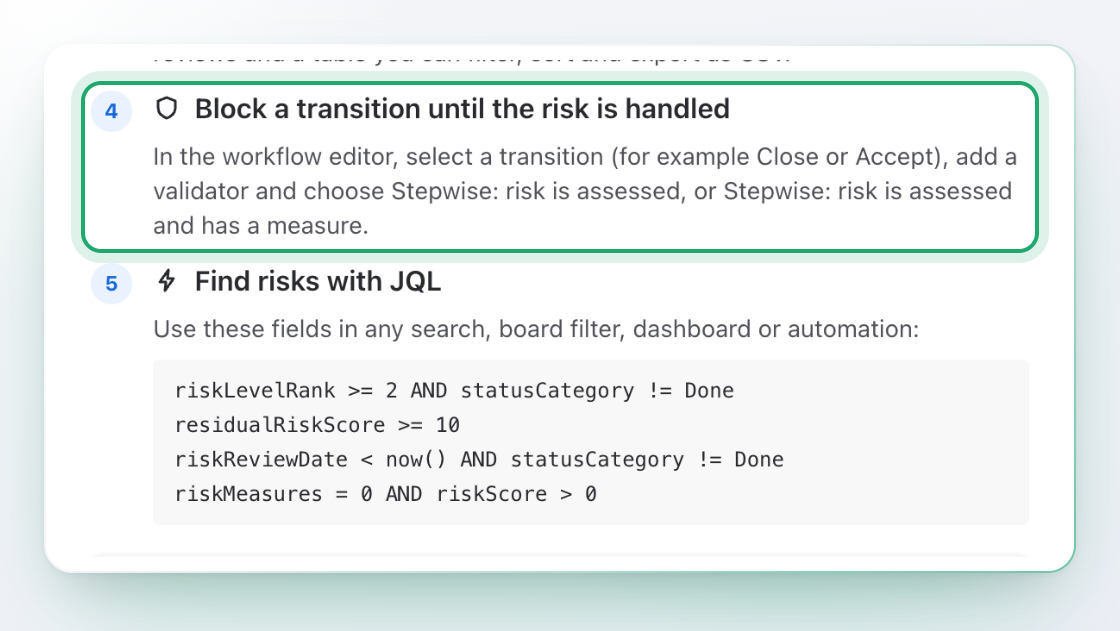
Risk closed with nothing done about it? Two workflow validators and ten JQL fields make the register part of your process, not a separate list.

  • Add Stepwise: risk is assessed to a transition such as Accept, or Stepwise: risk is assessed and has a measure to Close
  • Search by level, score, residual score, strategy, category, review date and number of measures
  • For example riskLevelRank >= 2 AND statusCategory != Done
Two steps of the Get started page: Block a transition until the risk is handled, ringed, and Find risks with JQL, with 4 example searches such as riskLevelRank >= 2 AND statusCategory != Done.

Start in four steps

Choose, model, assess, hold. Each step is useful on its own.

  1. Choose the risk work type

    A space admin marks the work type that holds risks, for example one called Risk.

  2. Pick a model

    Start from a ready-made one, or change the scale, levels and colours.

  3. Assess your risks

    Open a risk, pick probability and impact, add measures, set a review date.

  4. Hold a transition

    A workflow admin adds a validator to Accept, Close or any other transition.

Built on Forge, no external servers

Scores and dates, not people

A risk is stored in a property of its own work item. The app keeps scores, dates, category names and the ids of measures, and nothing that names a person. It is built on Atlassian Forge and sends nothing to any other server. It uses no AI.

No names, no account IDs

The owner of a risk is the assignee of the work item. The name is read from Jira to show it and is never stored.

No external servers

No copies elsewhere, no analytics, no third parties.

Jira permissions apply

What you do on screen runs as you. You see only the risks Jira lets you see.

Three permissions

Read and write work items, and app storage. See the docs.

Premium

For companies where every team keeps its own register.

Shared model library

Admins keep up to 30 models for the whole Jira site. A space picks one and follows it, so a change in the library reaches every space that uses it.

Overview of all spaces

See open risks, the highest levels, risks not assessed, overdue reviews and risks without measures for every space with a risk work type, and open the top risks of each.

History of assessments

See how the score of a risk changed over time: when, which steps, the score and the level. It never records who.

Questions and answers

What is a risk in Stepwise Risk Register?

A work item of the type your space admin marks as a risk, for example a work type called Risk. The app adds a Risk panel to it. It does not create work types, so a space admin adds the type in Jira first.

How is the score made?

From the model of the space. Classic 5×5 multiplies probability by impact and sets levels Low, Medium, High and Critical. You can change the scale, the formula (multiply, add or take the higher), the thresholds and the colours.

What is residual risk?

The risk after your measures. Set probability and impact again once the measures work, and the panel and the matrix show both. A risk without a residual assessment stays where it was.

What are measures?

Work items that treat the risk. Add one by key or create a new one in the space. The panel shows their status, and how many are done.

How do I keep reviews from slipping?

Give each risk a review date. The register page counts the overdue reviews and lists them, and the JQL field riskReviewDate finds them in any search or dashboard.

Can I block a transition until the risk is handled?

Yes. Add the validator “Stepwise: risk is assessed” or “Stepwise: risk is assessed and has a measure” to a transition in the workflow editor, for example Accept or Close. The docs walk through it.

Can I search risks?

Yes. JQL fields: riskScore, riskLevel, riskLevelRank, residualRiskScore, residualRiskLevel, residualRiskLevelRank, riskStrategy, riskCategory, riskReviewDate and riskMeasures.

Can I export the register?

Yes. The Risk register page exports what is on screen, with your filters, to CSV.

Does it store names or account IDs?

No. The owner of a risk is the assignee of the work item, and the name is read from Jira to show it. The app stores scores, dates, category names and work item ids.

Which parts need Premium?

The shared model library for every space, the overview of all spaces and the history of assessments carry a crown.

Does it use AI?

No. Scores come from your model, and the app is built on Forge with no external servers.

Is it a replacement for a certified quality system?

No. It helps you run and show a risk process in Jira. It does not certify anything.

Does it support dark theme?

Yes, it follows each person’s Jira theme automatically.

Move your risk register into Jira

Install it, choose the risk work type, assess your first risk. Add a validator when you are ready.