Stepwise Test Management for Jira

Ship only what is tested

Release on Friday, and nobody can say what was tested? Keep test cases, test cycles and results in the Jira work items your team already uses. One page shows every requirement with its tests: what passed, what failed and what nobody tests yet. No spreadsheets, no extra tool.

  • One page instead of a spreadsheet
  • No Done until every test passes
  • Built on Forge, no external servers
The Coverage page of Stepwise Test Management in Jira. Four tiles: 67% of requirements are covered by tests, 2 pass, 2 are failing or blocked, 2 have no tests. Next to them the two requirements nobody tests yet are ringed, and a large number under them says 2 of 6.

Jira shows what is done. Stepwise Test Management shows what is tested.

See what is tested before you ship

Every requirement with its test cases, their latest results and defects on one page. Requirements nobody tests yet are listed too.

No Done until every test passes

One check in the workflow holds a requirement until every linked test has passed in its latest run, and says why.

Bug reports with every step filled in

Create the defect from the step that failed. It gets the steps, the expected and actual result, the cycle and the environment.

What changes for your team

Questions every release raises, and the answer to each.

One page shows what is tested

Tests in a spreadsheet, results in chat? Link tests to stories and epics with an ordinary Jira link, and the Coverage page shows each requirement with its tests and their latest results.

  • Requirement, test cases, latest result and defects, one under another
  • Four numbers on top: covered, passing, failing or blocked, no tests
  • Filter to the requirements that fail, are blocked or have no tests yet
  • The same answer on every story: its panel lists the tests that cover it
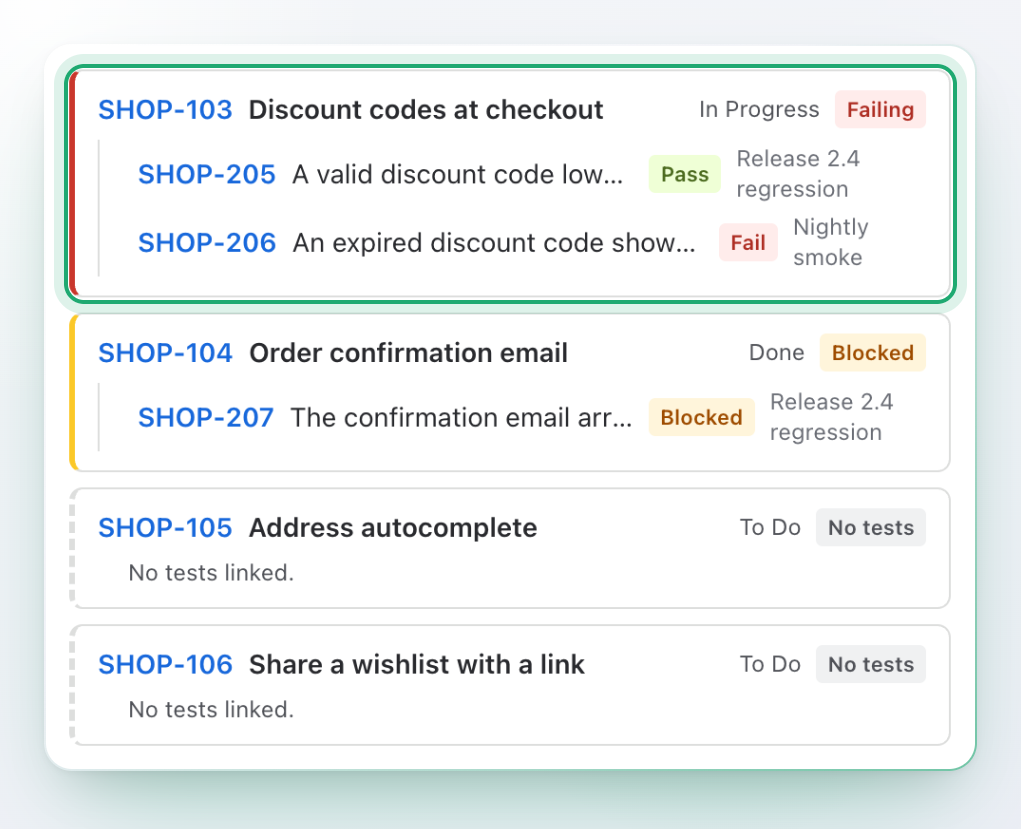
The Coverage page: the requirement SHOP-103 is ringed and marked Failing, with one test that passed and one that failed. Under it a blocked requirement and two requirements with no tests.

Follow the release to the last test

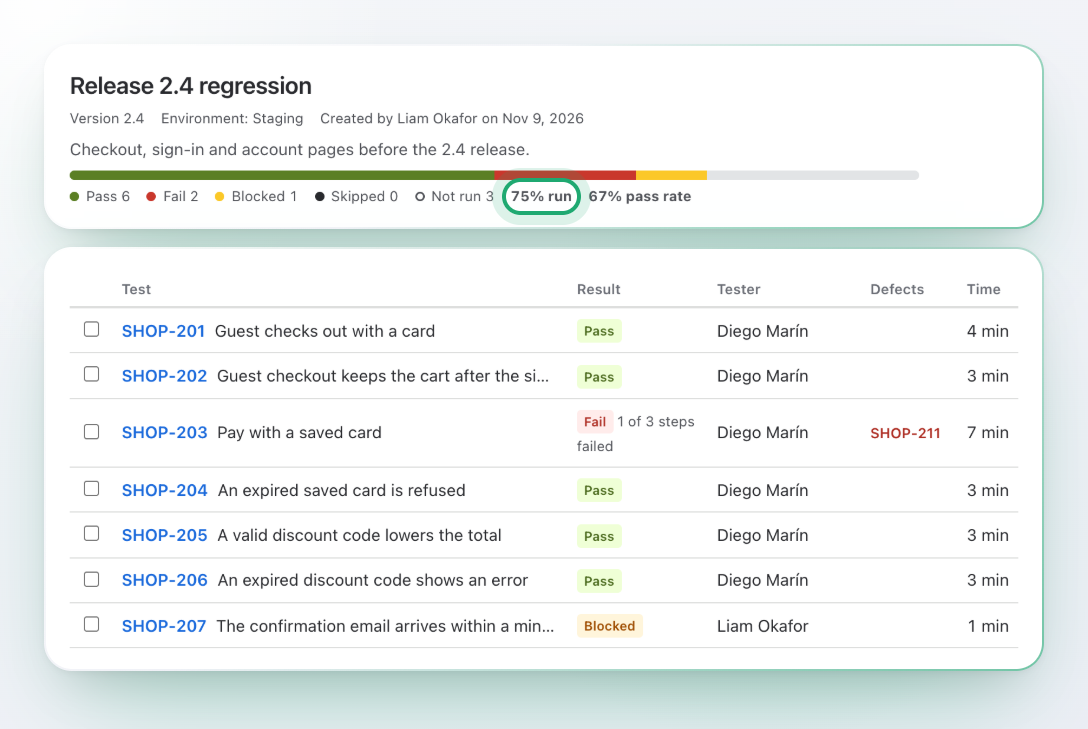
How far is the regression? A test cycle is one round of testing for a version, a sprint or an environment, with its progress on one line.

  • Add tests by JQL or by key
  • Assign testers, and filter to the tests assigned to you
  • Pass, Fail, Blocked, Skipped and Not run counted as you go, with the pass rate
  • Close a cycle when it is done; its results stay as they are
The test cycle Release 2.4 regression: a bar of results with 75% run ringed and 67% pass rate next to it, then the list of tests with result, tester, defect and time.

A result for every step

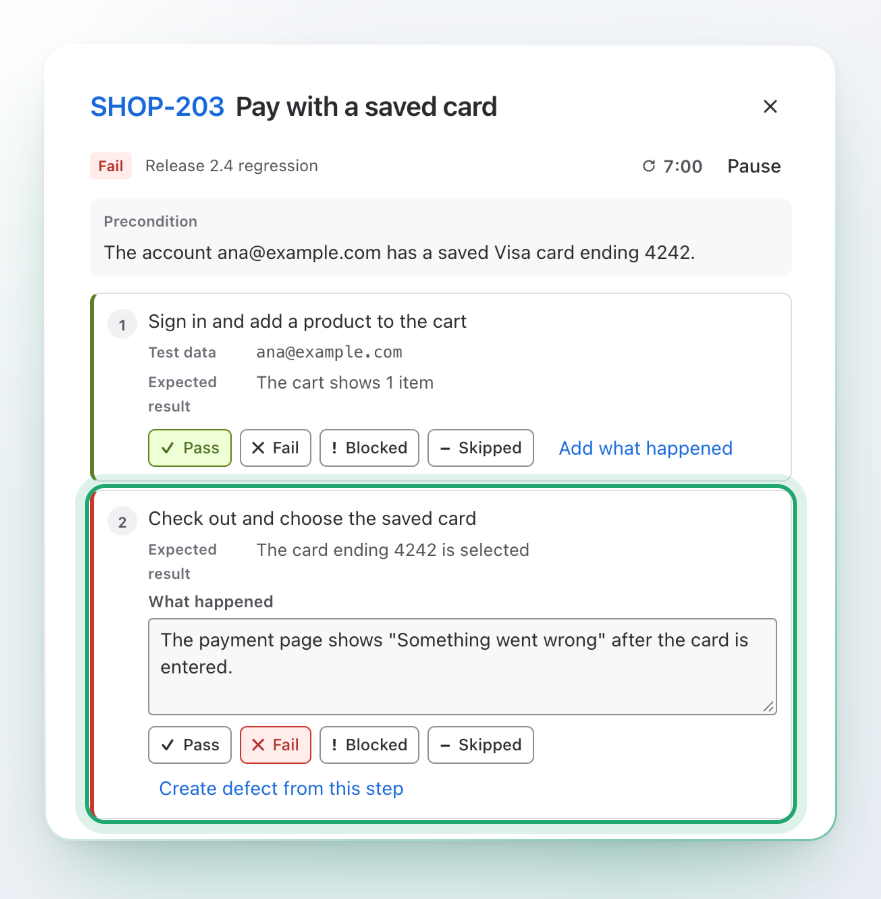
Which step failed, and what happened? Run a test step by step and write down what you saw, while a timer counts.

  • Pass, Fail, Blocked or Skipped for each step and for the whole test
  • What happened, the actual result and a note
  • Steps are frozen with the first result, so editing the test later never rewrites a run
  • If the test changed since, the run says so and can be run again with the current steps
A test run in a window: step 1 passed; step 2 failed and is ringed, with a note that the payment page shows an error and a link to create a defect from this step.

Bug reports with every step filled in

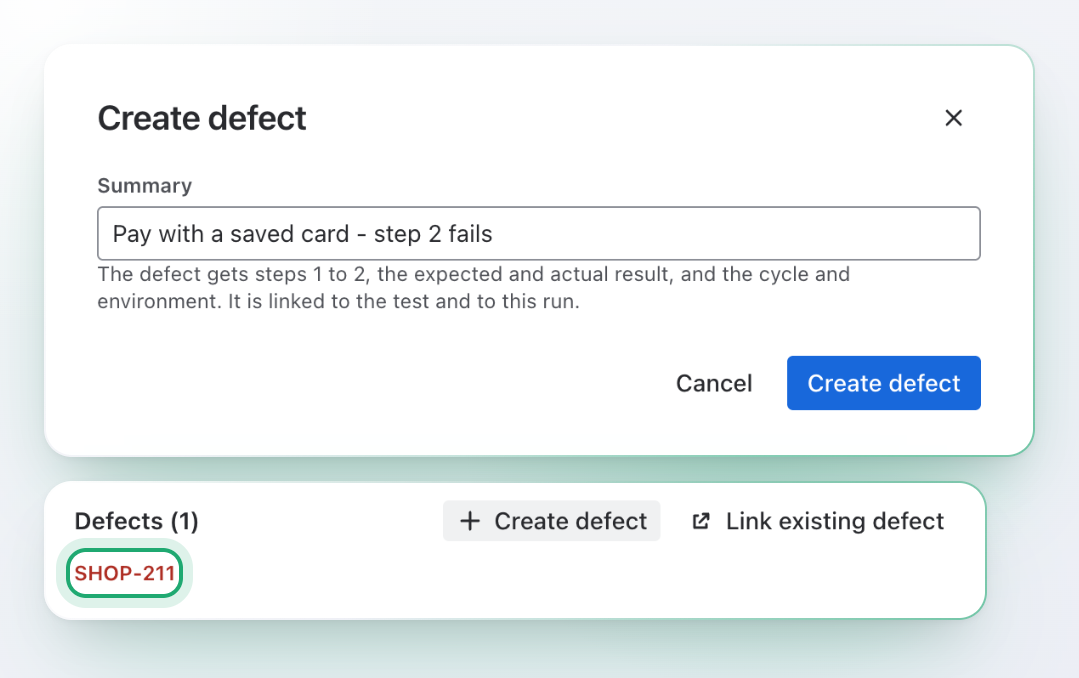
No more “how do I reproduce it?” Create the defect from the step that failed, and the developer finds everything in the bug.

  • The steps up to the failing one, with the expected and the actual result
  • The cycle and the environment it was found in
  • Linked to the test and recorded on the run
  • Or link a defect that already exists by its key
The Create defect window for the failed step 2, saying that the defect gets steps 1 to 2, the expected and actual result, the cycle and the environment. Under it the defects of the run, with SHOP-211 ringed.

No Done until every test passes

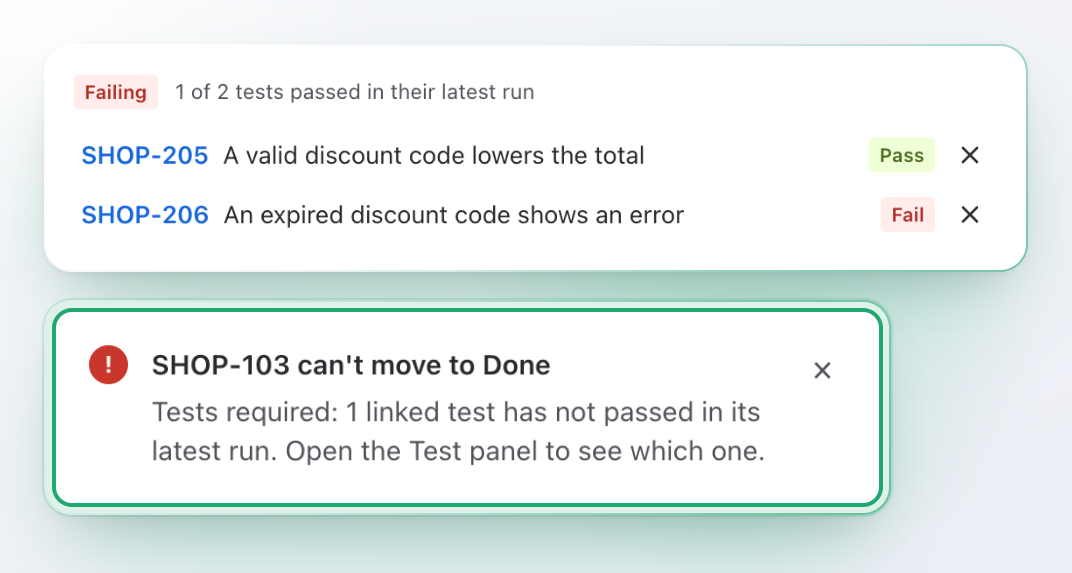
A story marked Done while its test fails becomes your customer’s bug. One check in the workflow stops that.

  • A requirement moves on only when every linked test has passed in its latest run
  • If you wish, a requirement with no tests is held back too
  • The message says how many tests have not passed
  • Results come from the app’s own storage, so editing a field cannot get around it
A requirement with two linked tests, one passed and one failed. Under it the ringed message from Jira: SHOP-103 can't move to Done. Tests required: 1 linked test has not passed in its latest run.

See what needs attention first

What do you tell the team today? The report of a cycle is already written.

  • How much is run, the pass rate, defects found and time spent
  • Failed and blocked tests on top, each with its defect
  • Results by tester and by component, and flaky tests
  • Download a cycle or its report as CSV
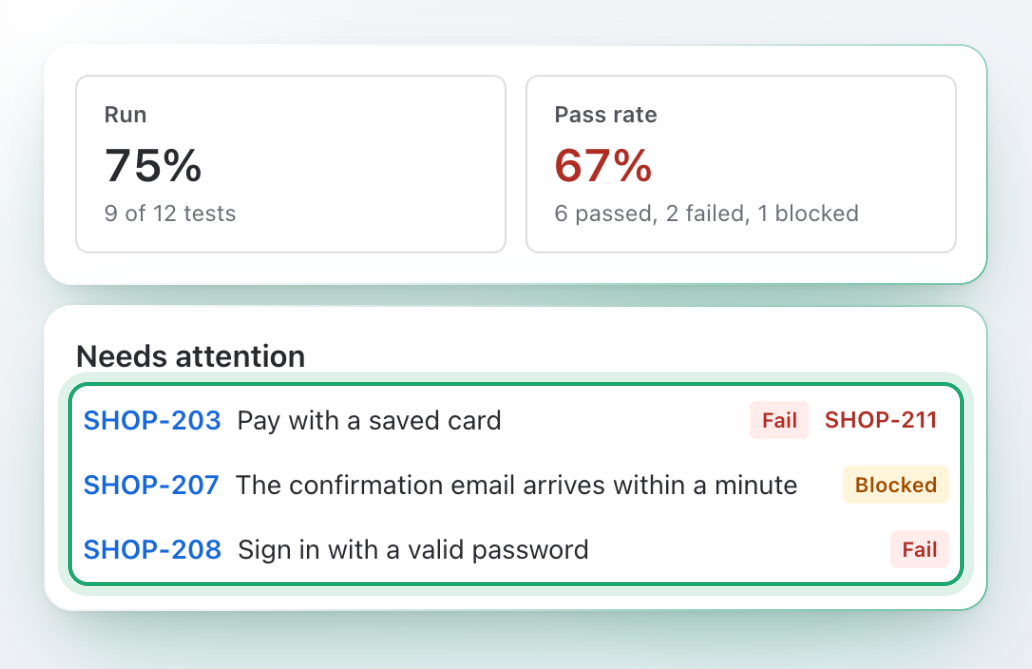
The report of a test cycle: 75% run, 67% pass rate. Under the two numbers the 3 tests that need attention are ringed: two failed, one is blocked.

Test cases live in your work items

One more tool just for test cases? A test case is an ordinary work item, so search, boards, permissions and filters work as they always do.

  • A Test panel with the precondition and the steps: action, test data, expected result
  • Drag to reorder, duplicate a step, copy steps from another test
  • Up to 200 steps in a test
  • Find tests and requirements with JQL: testResult, testCoverage, coveringTests
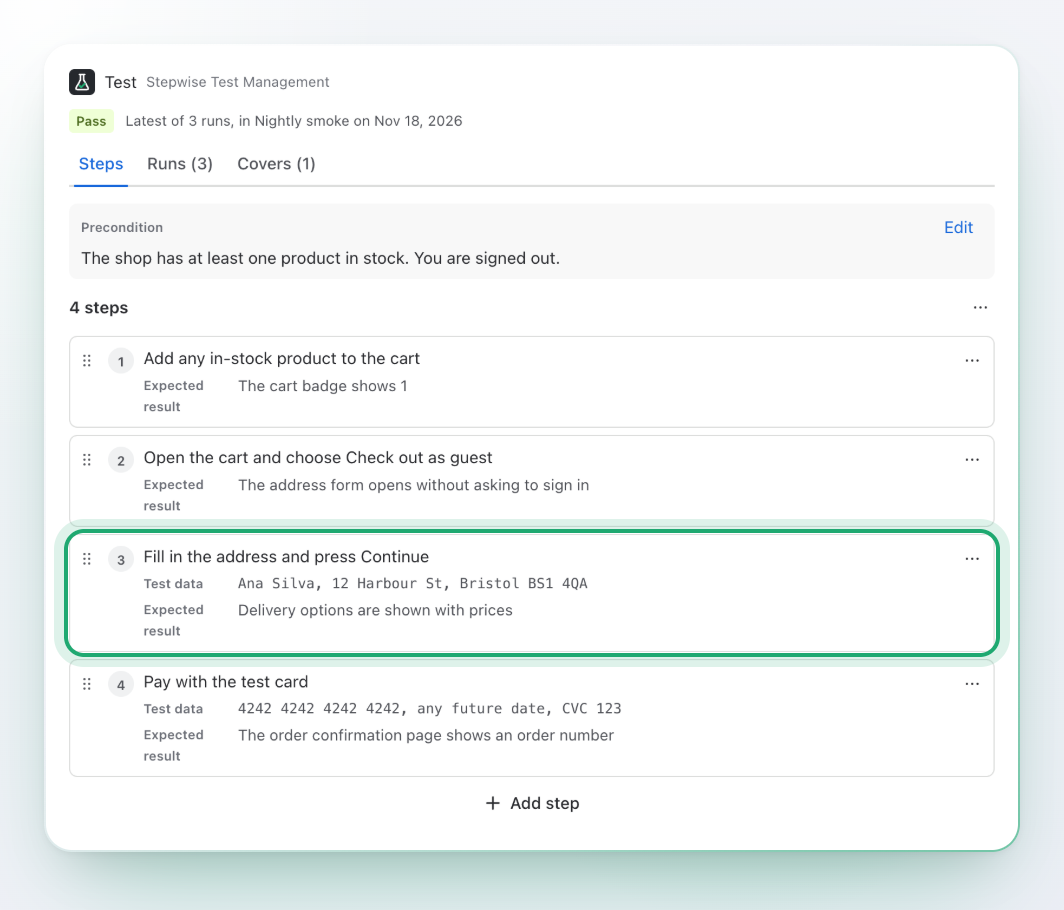
The Test panel on a Jira work item: a precondition and four steps. Step 3 is ringed: fill in the address and press Continue, with its test data and expected result.

Paste the list, get the steps

Test cases stuck in a spreadsheet? Copy the rows, paste them, and every line becomes a step.

  • Columns become action, test data and expected result
  • Or write “Action | Data | Expected” or “Action -> Expected”
  • A preview shows every step before anything is added
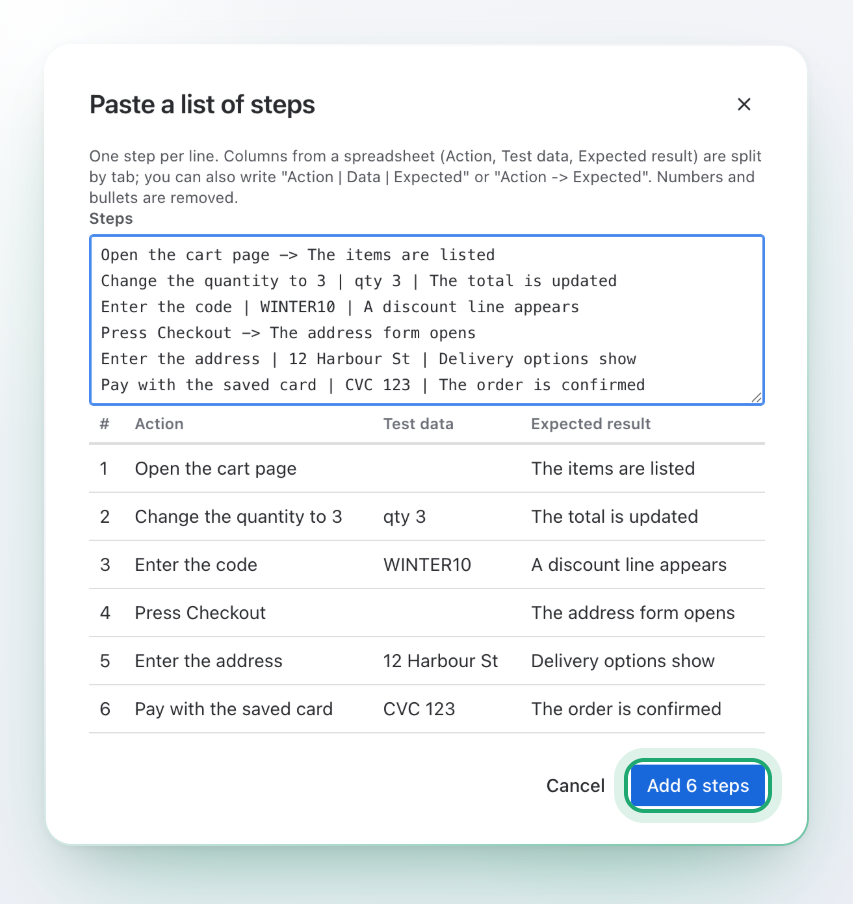
The Paste a list of steps window: six pasted lines, a preview with action, test data and expected result for each, and the ringed button Add 6 steps.

Start in four steps

Choose, write, run, review. Each step is useful on its own.

  1. Choose your work types

    A space admin marks which work types are tests and requirements, and which link type means “tests”.

  2. Write your tests

    Add steps in the Test panel, or paste a list from a spreadsheet.

  3. Run a cycle

    Add tests by JQL, assign testers, record results and file defects.

  4. Review coverage

    Open the Coverage page and the reports, and add the transition check when you are ready.

Your data stays in Jira

Your tests stay in your Jira

The app is built on Atlassian Forge and has no external servers. It keeps its data in your Atlassian cloud, sends nothing anywhere else and has no analytics. Actions you take, such as creating a test or a defect, are made as you, so Jira permissions apply.

No external servers

No copies elsewhere, no analytics, no third parties.

No new work types, fields or screens

A test case is a work item of the type you mark as Test. Your configuration stays as it is.

Jira permissions apply

Steps, defects and links are written as the person who makes them, never above what Jira allows that person.

Five permissions, each with a reason

Read and write work items, read user names, app storage and personal data reporting. See the docs.

Premium

For QA teams that need audit evidence, a shared library and data-driven tests.

Tamper-evident run log

Every result is chained to the one before it, per cycle. Check the chain in one click and export it as evidence.

Traceability matrix

Requirements against tests in one grid, with CSV export for auditors and release reviews.

Shared test library

Add tests from any space to a cycle, so one regression suite serves many teams.

Datasets and parameters

One test, many rows of data. Use {{name}} placeholders in steps and get one run per row.

Questions and answers

What is Stepwise Test Management for Jira?

It is test case management inside Jira Cloud. You write test cases with steps, group them into test cycles, run them step by step, file defects from failed steps, and see which requirements are tested.

Does it add work types, fields or screens?

No. A test case is an ordinary work item of the work type your space admin marks as Test in the app’s space settings. Requirements are the work types you pick, for example stories and epics.

How do tests link to requirements?

With an ordinary Jira link type that your space admin chooses. A link of that type from a test to a requirement counts as coverage.

Can it stop a requirement from moving to Done?

Yes. A Jira admin adds the check to a workflow transition. The requirement waits until the latest result of every linked test is Pass, and optionally until it has at least one test. The docs show how.

Can I create a defect from a failed step?

Yes. It becomes a bug with the steps up to the failing one, the expected and actual result, the cycle and the environment. It is linked to the test and recorded on the run. You can also link an existing defect by key.

Do the steps change after I run a test?

No. The steps are frozen with the first result. If the test is edited later, the run says that the test changed since, and you can run it again with the current steps.

Can I bring the test cases I already have?

Yes. Paste a list of steps from a spreadsheet or a document: every line becomes a step, and columns become action, test data and expected result. You can also copy the steps of another test by its key.

What do the reports show?

For every cycle: how much is run, the pass rate, defects found, time spent, the tests that failed or are blocked, results by tester and by component, and flaky tests. A cycle and its report download as CSV.

Can I search tests with JQL?

Yes: testResult, testRuns, testSteps, testCoverage and coveringTests, for example testCoverage = "failing" or testResult = "fail". They work in filters, boards and dashboards.

Where is my data?

In your Atlassian cloud. The app is built on Atlassian Forge, with no external servers and no analytics.

Does it support dark theme and small screens?

Yes. It follows each person’s Jira theme and works on narrow screens.

Know what is tested before the next release

Install it, mark your test work type, write the first test and run your first cycle.