The loudest voice sets every estimate? Run scrum poker inside Jira: every card stays hidden until the reveal, the team sees at once where it stands, and the accepted story points are written to the work item. Live or async, from a sprint, the backlog or JQL. No anchoring, no retyping.
The first number said out loud becomes everyone’s number. Stepwise Poker gets you the team’s estimate, not the loudest one.
Hear what everyone really thinks
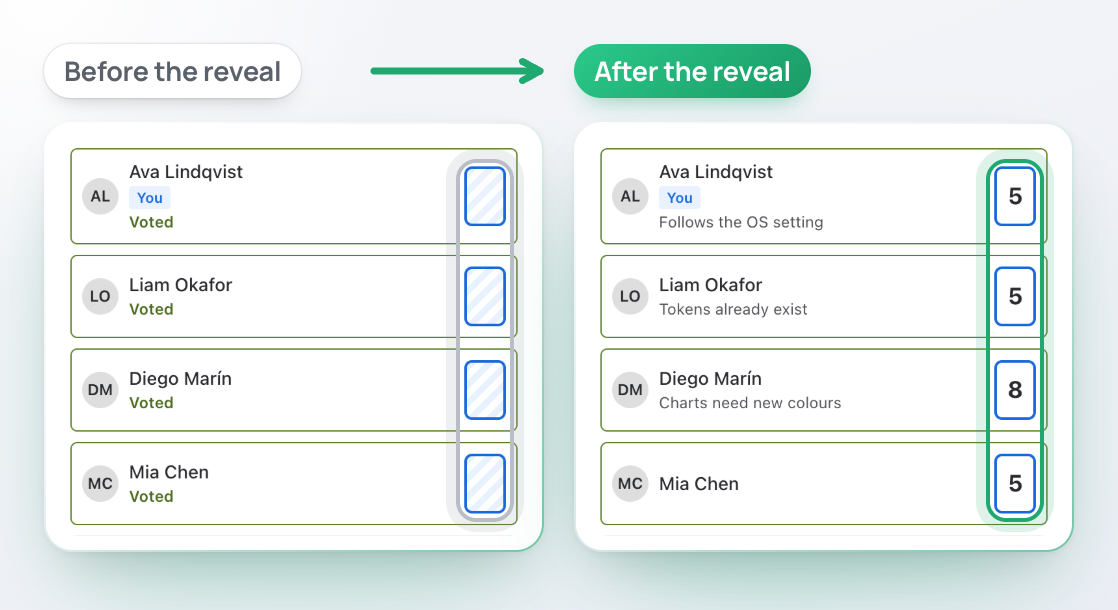
Every card stays hidden until the reveal, then all turn over at once, each with its note. Nobody is anchored.
Story points saved, not retyped
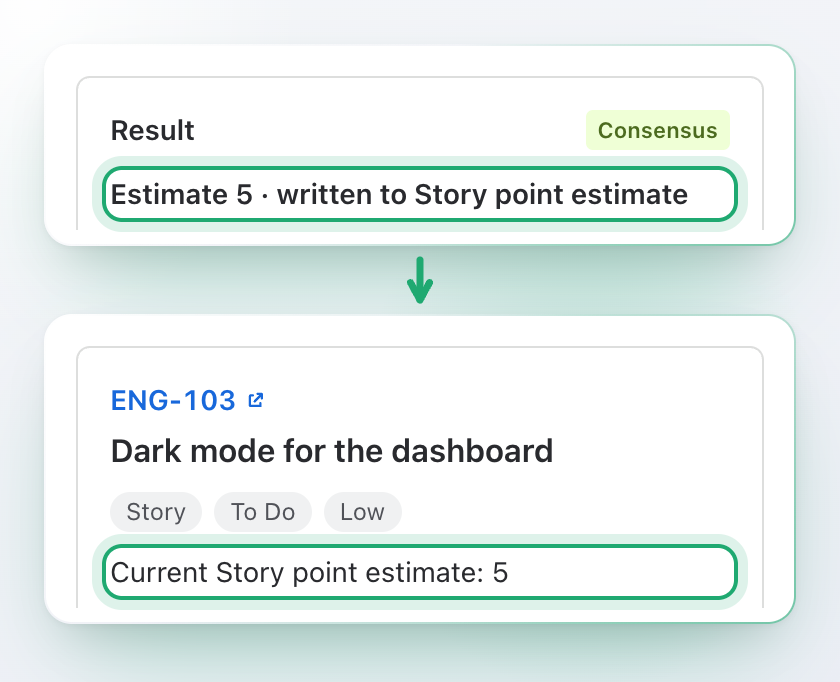
Accept the estimate and it is written to Story point estimate, Story points or Original estimate. If Jira says no, you are told why.
Vote when it suits you
Half the team asleep when the call starts? An async session with a due date lets everyone vote in their own time.
What changes for your team
What goes wrong in an estimation meeting, and the answer to each.
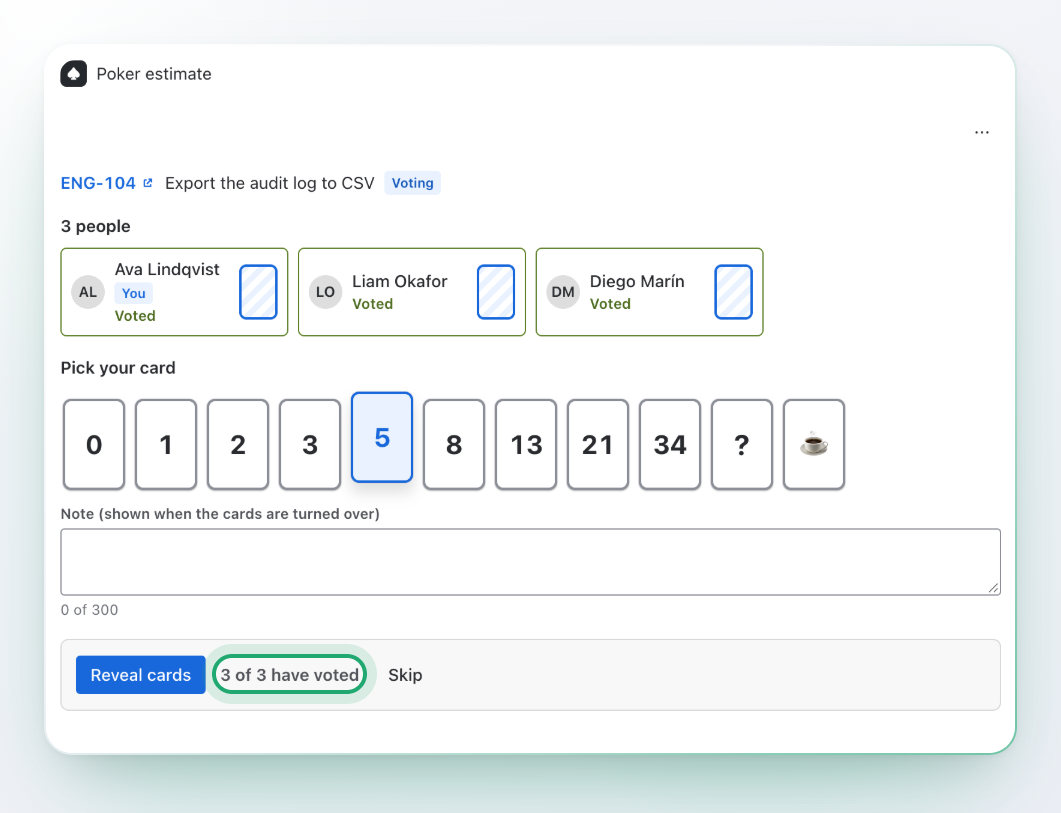
Vote in secret, reveal together
One card seen, and the rest follow. So nobody sees a card until everyone has put theirs down: the screen shows who has voted, never what.
Every card turns over at the same moment
A note with each card, shown at the reveal, for the reason behind the number
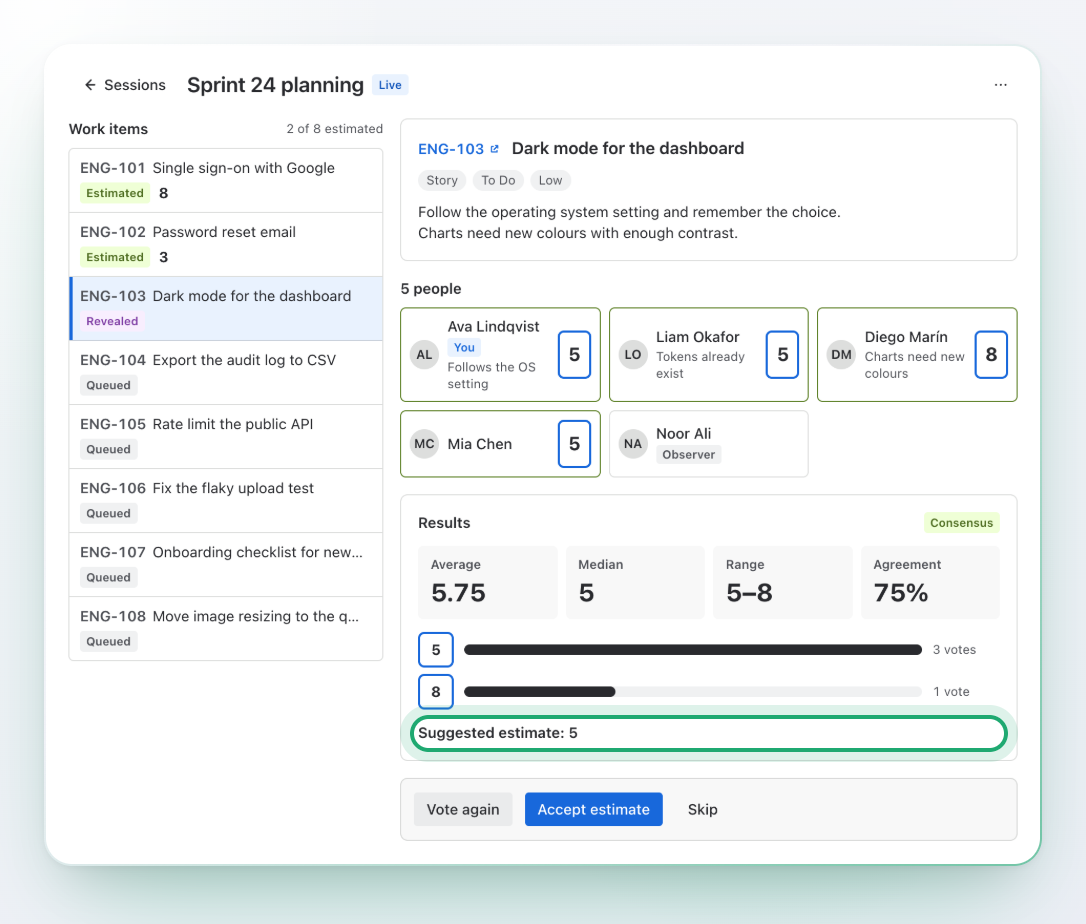
Observers watch without voting and do not count in the result
? and break cards in every deck
The whole round on one screen
No call plus a chat plus a spreadsheet. The work item, the cards and the result sit together, and the numbers are counted for you the moment the cards turn over.
Average, median, range and agreement
Consensus flagged when the cards sit on the same or neighbouring values
A suggested estimate: the card nearest to the median
The work item with its description next to the cards
Split vote? Talk, then vote again
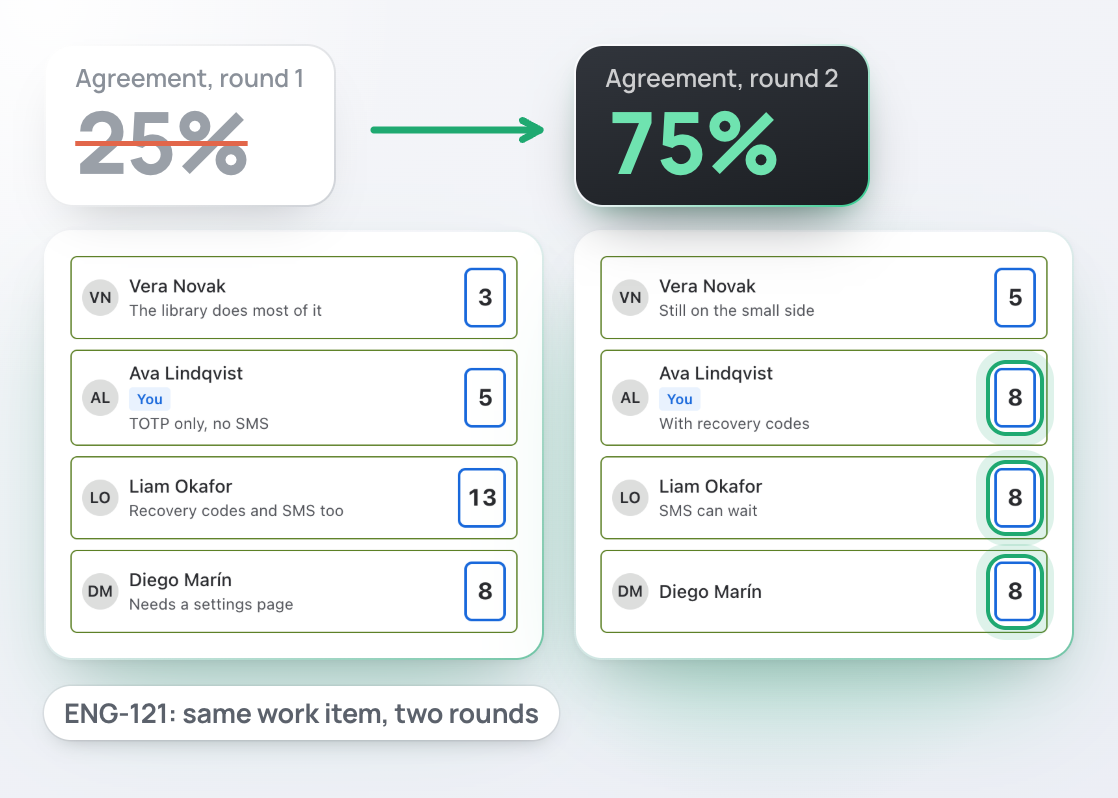
When the cards are far apart, you see it at once and talk about that work item only. A fresh round takes one click.
Vote again starts a new round on the same work item
Earlier rounds stay on the screen: votes, range and median
A round timer from 15 seconds to 60 minutes
Nothing is revealed on its own: the facilitator decides
Story points saved, not retyped
Who types the numbers into Jira after the call? Nobody. The facilitator accepts, and Jira has the number.
Written to Story point estimate, Story points or Original estimate: you choose once for the space
Saved as the facilitator, with the facilitator’s own Jira permissions
Pick the suggested card, another card, or type a number
If Jira refuses, the screen says why and nothing is lost silently
Sprint in, session ready
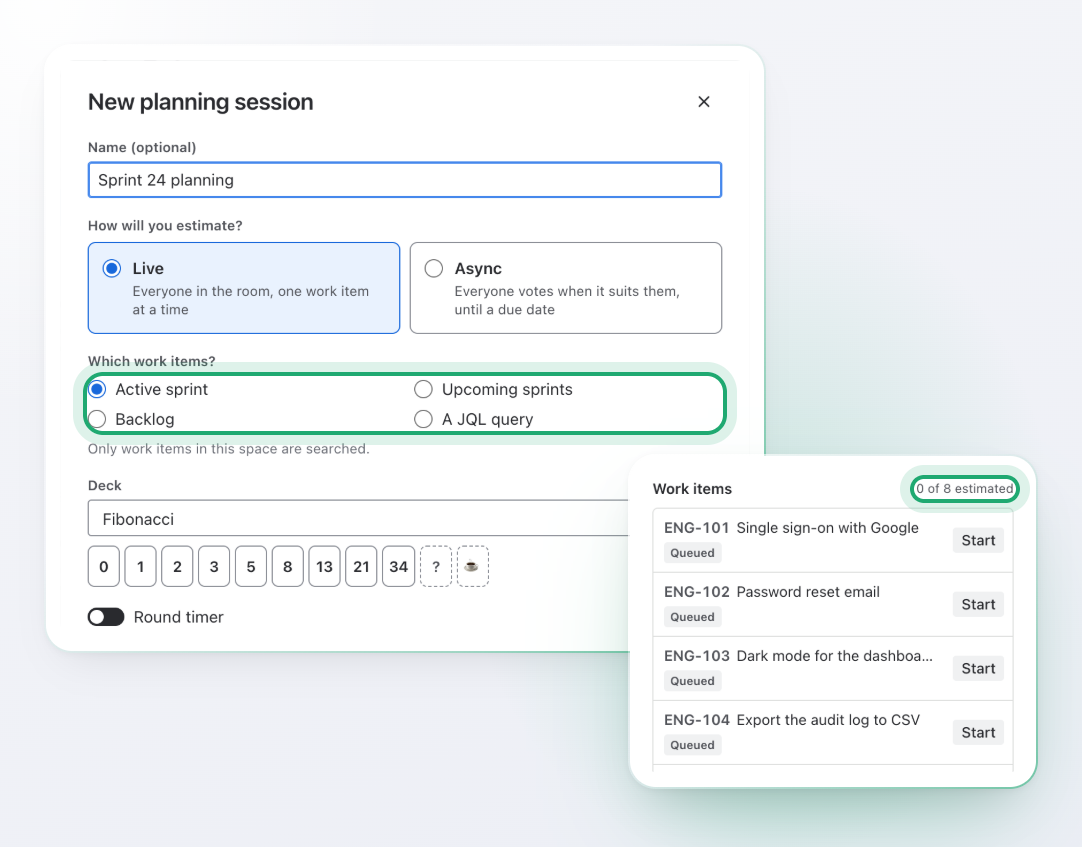
No copying work items into another tool. A new session is a few choices: where the work items come from, which deck, live or async.
Active sprint, upcoming sprints, the backlog, or your own JQL query
Up to 150 work items in a session, in backlog rank order
Fibonacci, modified Fibonacci, powers of 2 and T-shirt decks
Only work items of your space, and only the ones you may see
Vote when it suits you
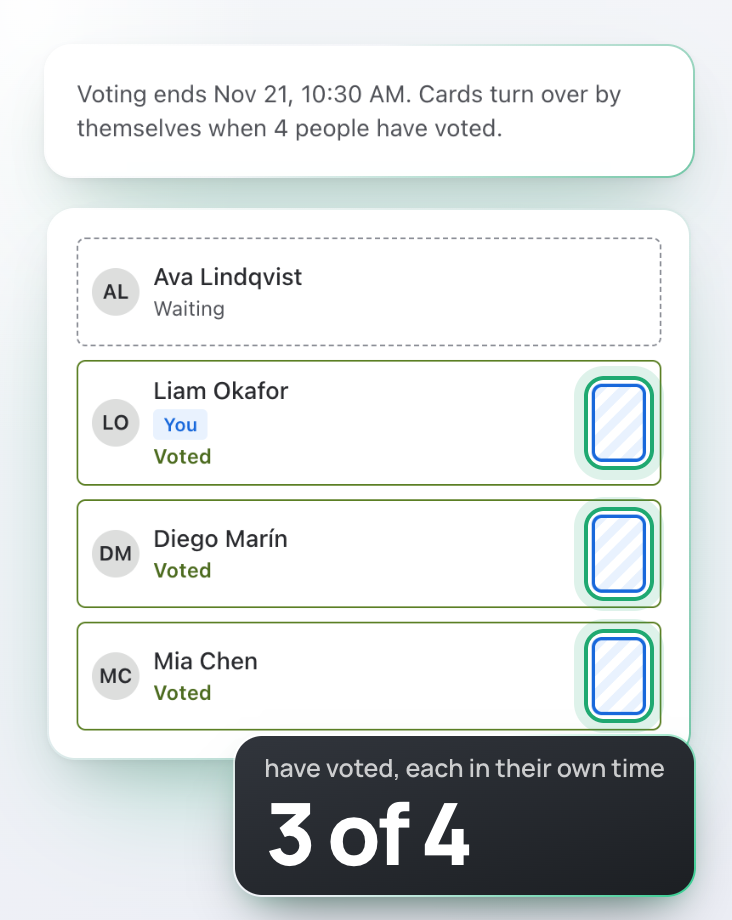
A team spread across time zones needs a due date, not a meeting. Open every work item at once and let people vote in their own time.
A due date for the session, up to 90 days ahead
A note with every vote, for the reasoning behind the number
A work item reveals when the expected number of people have voted, at the due date, or on the facilitator’s button
The facilitator accepts the final estimate of each work item
Estimate right on the work item
One new work item does not need a whole meeting. Open it, start a round, and your colleagues join from their own screen.
A Poker estimate panel on the work item
One button starts a round for that work item alone
Colleagues who open the same work item join the same round
The same reveal, the same results, the same write to Jira
Every estimate keeps its story
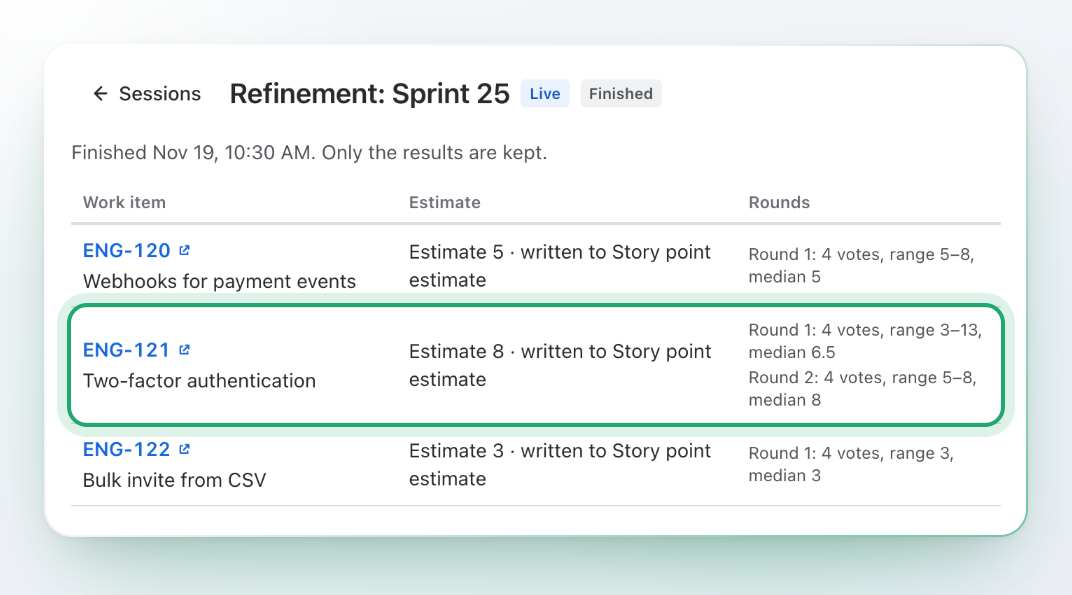
“Why did we say 8 for this one?” Open the finished session: every work item has its estimate and the rounds it took.
The accepted estimate of each work item, and where it was written
Every round with its votes, range and median
Numbers only: who voted what is not kept
From backlog to estimate in three steps
Pick, vote, accept. Repeat for each work item.
Pick the work items
Open Stepwise Poker in your space, press New session and choose a sprint, the backlog or a JQL query.
Vote and reveal
Everyone picks a card. The facilitator reveals, the team talks, and Vote again starts a new round if needed.
Accept the estimate
The facilitator accepts a card or a number, and it is written to the work item.
Built on Forge, no external servers
Your votes stay in Jira
Sessions, votes and notes live in Atlassian-hosted app storage and are never sent to any other server. When a session is closed, the results stay and the names go: only numbers and the final estimates are kept, never who voted what.
No copies elsewhere, no analytics, no third parties.
Hidden until the reveal
The screen shows who has voted, not what, until the facilitator reveals. Nobody sees another person’s card early.
Results without names
A closed session keeps the number of votes, lowest, highest, average, median, agreement and the final estimate.
Five permissions, each with a reason
Read and write work items, read users for names, app storage and personal data reporting. See the docs.
Premium
For agile coaches and delivery leads who want to see how the team estimates, not only what.
Your own decks
Build up to 10 decks of up to 20 cards each, for your team’s own scale.
Insights
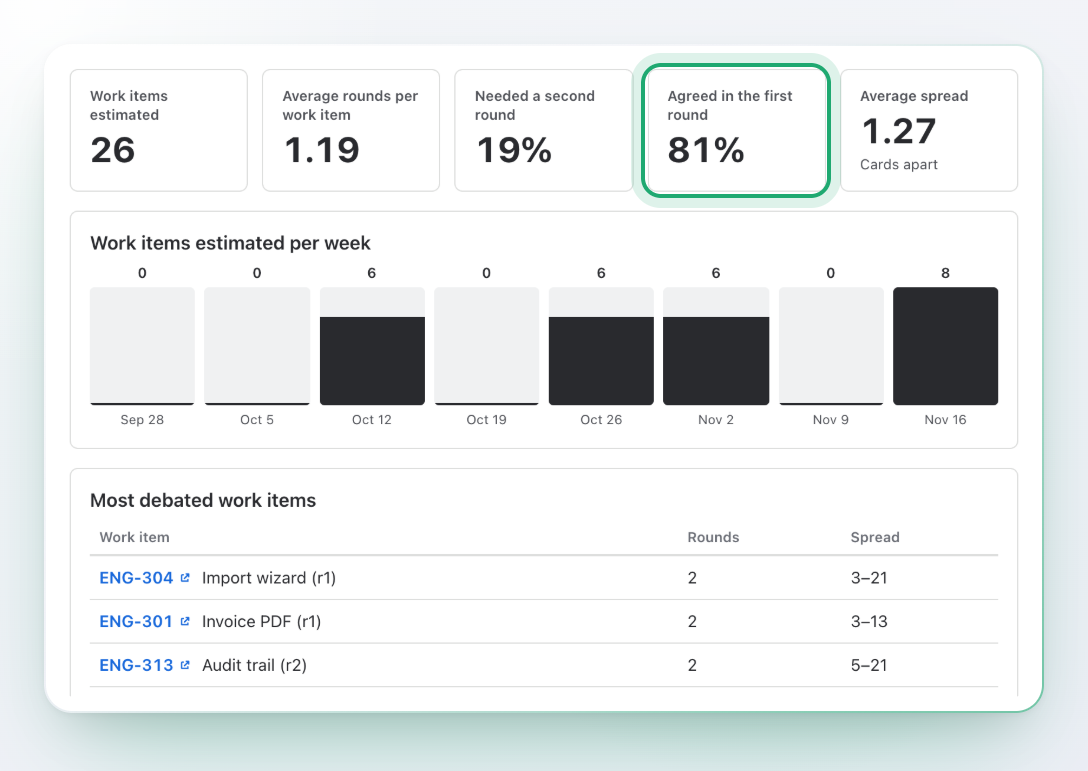
Same debates every sprint? See how often the first round agrees, how many work items need a second round, the average spread, eight weeks of trend and the most debated work items.
Full history and CSV
Every finished session at hand, and a CSV download of the results for your own reports.
Questions and answers
Where is the estimate written?
When the facilitator presses Accept estimate, it is written to the field chosen in the space settings: Story point estimate, Story points (or another number field) or Original estimate. You can also choose not to write to Jira and keep the result in the session only.
What if Jira refuses to save it?
The screen shows Jira’s reason, for example that the field is not on the work item’s edit screen. The estimate is not accepted until you retry, pick another card or accept it without writing to Jira. A refused write is never hidden.
Which work items can I put in a session?
The active sprint, upcoming sprints, the backlog (work items without a sprint) or any JQL query, limited to the work items of your space that you can see. A session holds up to 150 work items.
What if the team is far apart on a work item?
The reveal shows the range and the agreement, so you see it at once. Talk it through and press Vote again for a fresh round on the same work item. Every round stays in the results of the session.
Can observers watch?
Yes. An observer sees the room and the results without voting, and does not count in the average. A person makes themselves an observer; the facilitator always takes part.
Live or async: which should we use?
Live suits a call: one work item at a time, the facilitator moves the team through. Async suits teams in different time zones: every work item is open at once, each person votes when it suits them and adds a note, and each work item is revealed when enough people have voted, at the due date or when the facilitator decides.
What happens to the votes after a session?
The votes and notes of a work item are removed when the work item is finished. When the session is closed, only the results stay: number of votes, lowest, highest, average, median, agreement and the final estimate. Names are not kept.
Which decks are there?
Fibonacci (0 1 2 3 5 8 13 21 34), modified Fibonacci (0 ½ 1 2 3 5 8 13 20 40 100), powers of 2 (0 to 64) and T-shirt sizes XS to XXL, each with a number behind it. Every deck has a ? card and a break card. Premium adds your own decks.
Can I estimate a single work item without a meeting?
Yes. Open the work item and use the Poker estimate panel: Estimate this work item starts a round for it, and your colleagues join the same round from their own screen.
Is there a round timer?
Yes, from 15 seconds to 60 minutes. When it runs out the screen says Time’s up. Nothing is revealed on its own: the facilitator decides what happens next.
Where is my data stored?
In Atlassian-hosted app storage, inside Jira. The app is built on Forge with no external servers, and it asks for five permissions. The docs list what is stored and for how long.
Does it support dark theme?
Yes, it follows each person’s Jira theme automatically.
Run your next estimation session in Jira
Install it, open Stepwise Poker in your space, and start a session from your sprint.