Stepwise Excel & PDF Exporter for Jira

Export from Jira, ready to send

Export from Jira, then fix it by hand? Pick the work items and press Export: you get a real Excel workbook, a PDF or a Word document, with comments, worklogs and history already in it. Nothing to clean up before you share it, and nothing is sent to any server.

  • A real workbook, not a flat CSV
  • Comments and history come along
  • Built on Forge, no external servers
The Export card of the app says Done: 7 work items, with the file name ending in .xlsx. Next to it is the workbook it made: a sheet with a dark header, keys as links, hours as numbers and a Total row, and five sheet names ringed. A large number says 5 sheets.

Jira’s own export hands you raw data. Stepwise Excel & PDF Exporter hands you the finished file.

A real workbook, not a flat CSV

Numbers are numbers, dates are dates and keys are links, under a frozen header with filters and a Total row. Open it and start working.

Comments and history come along

Comments, worklogs, change history and links land on their own sheets in Excel, or in their own sections in PDF and Word.

Send a document, not a data dump

A list, a card per work item or a report grouped by epic, as a PDF or a Word file. Headings, lists, tables and code from Jira carry over.

What changes for your team

What hurts in every export from Jira, and the answer to each.

A real workbook, not a flat CSV

One flat CSV, and the cleanup is yours? Here the file is ready when it lands: sort it, filter it, sum it.

  • Numbers, dates and hours are typed cells, so they sort and add up
  • The header stays put, the filters are on and the column widths are set
  • Keys link back to the work item in Jira
  • A Total row with a live formula under the numeric columns
  • Child work items come along with their level
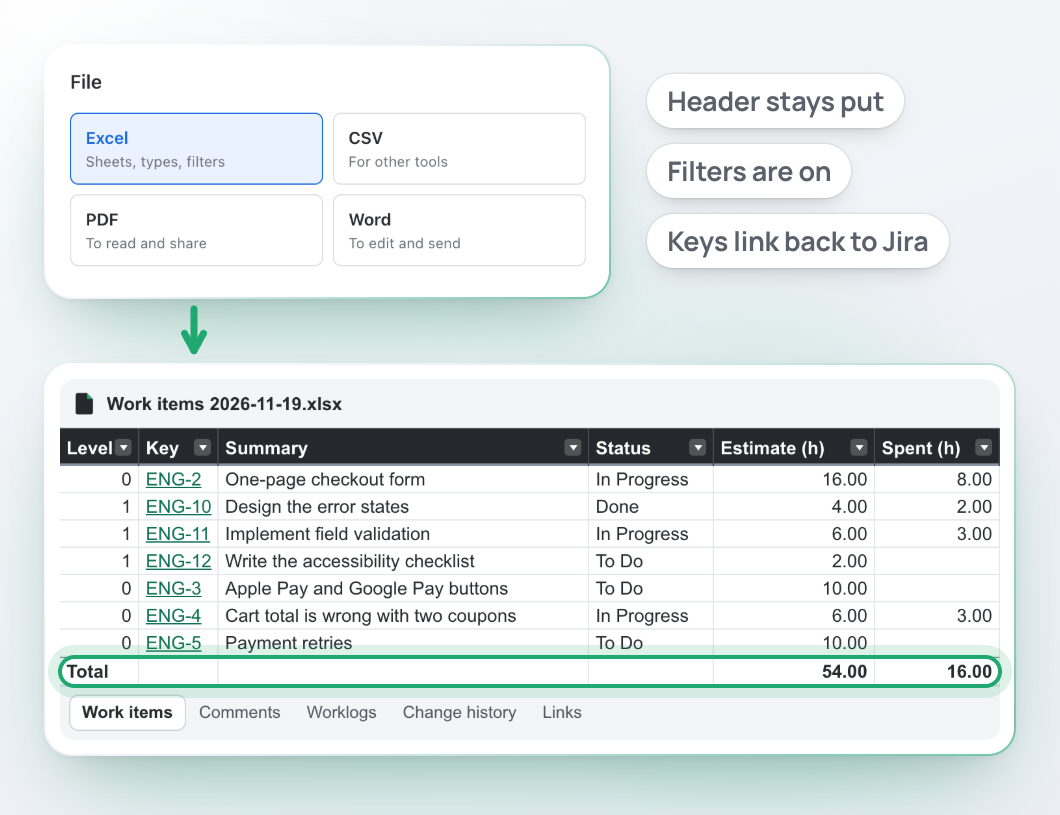
The File card with Excel chosen, and the workbook it made: a sheet with a frozen dark header and filter buttons, keys as links, hours as numbers and a ringed Total row that reads 54.00 and 16.00. Sheet names under it: Work items, Comments, Worklogs, Change history, Links.

Comments and history come along

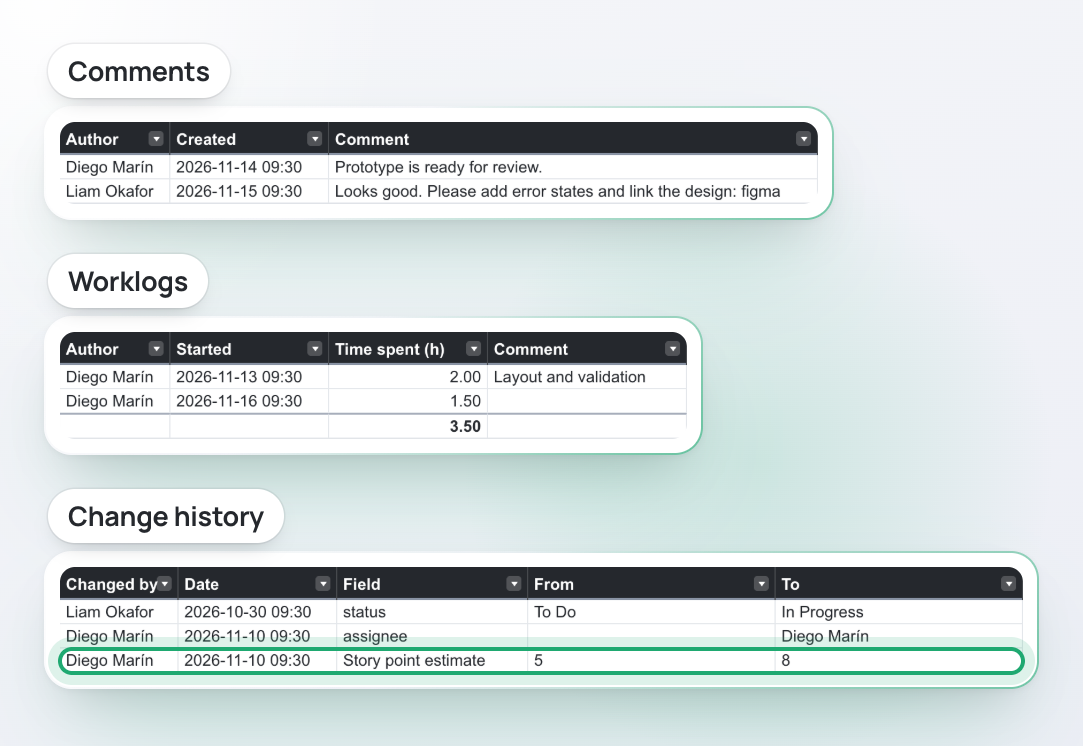
An auditor asks what happened, and when. Fields alone do not tell. Switch on what you need, and each lands on its own sheet.

  • Comments with their author and date
  • Worklogs with the hours as numbers and a total under them
  • Change history: who changed which field, from what to what, and when
  • Links between work items, with the status of the other side
  • In PDF and Word the same things are sections under each work item
Three sheets of one exported workbook. Comments: author, date and text. Worklogs: author, start, hours and a total of 3.50. Change history: who changed which field, from what to what; the row where the story point estimate went from 5 to 8 is ringed.

Send a document, not a data dump

A customer or a manager wants something they can read. Export it as a PDF or a Word file and send it as it is.

  • Three layouts: a list, a card per work item, or a report grouped by epic, work type or status
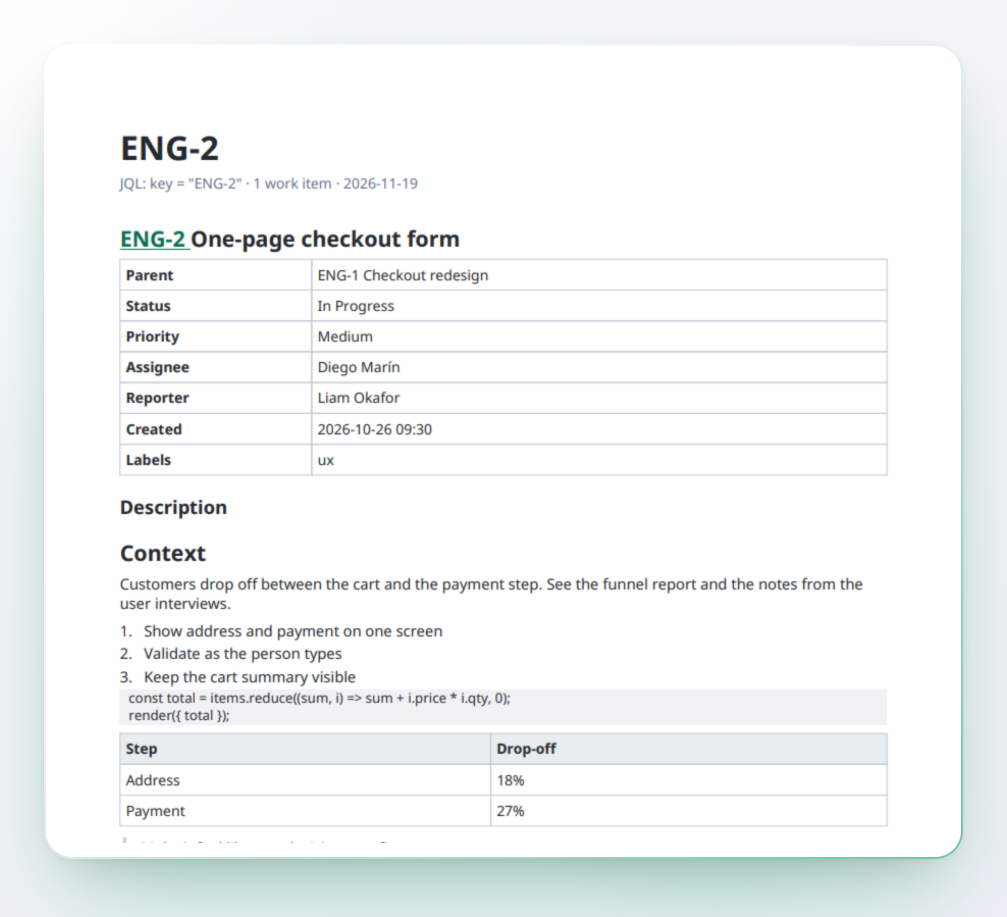
  • Descriptions keep headings, lists, tables, code, quotes and links
  • Comments, worklogs and history under each work item
  • A4 or Letter, portrait, landscape or automatic
  • PDF draws Latin, Latin Extended, Cyrillic, Greek and Vietnamese text
A work item exported as a PDF card: the key and summary, a table of fields, then the description with a numbered list, a block of code and a table.

Only your fields, in your order

Columns you never asked for, in the wrong order? Pick exactly the fields you need and name the columns your way.

  • Search every field on your site, custom fields included, and tick what you need
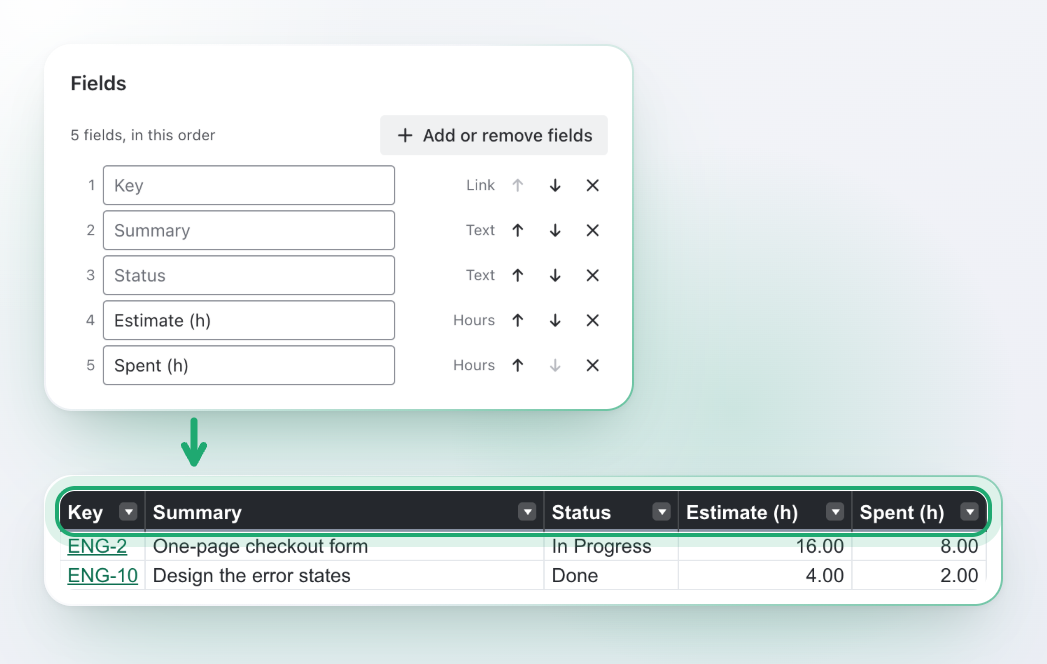
  • Move a column up or down, and rename it in the file
  • Pick the work items by space, saved filter or any JQL
  • The file has exactly these columns, in this order
The Fields card of the app with five fields in order, two of them renamed to Estimate (h) and Spent (h). Under it, the header row of the exported sheet with the same five columns, ringed.

Save the setup once, reuse it

Rebuilding the same export every week? Save it as a preset, and next week you only pick it and press Export.

  • Ready-made: basic list, planning, time tracking, full detail, simple CSV, printable work item card, document by parent
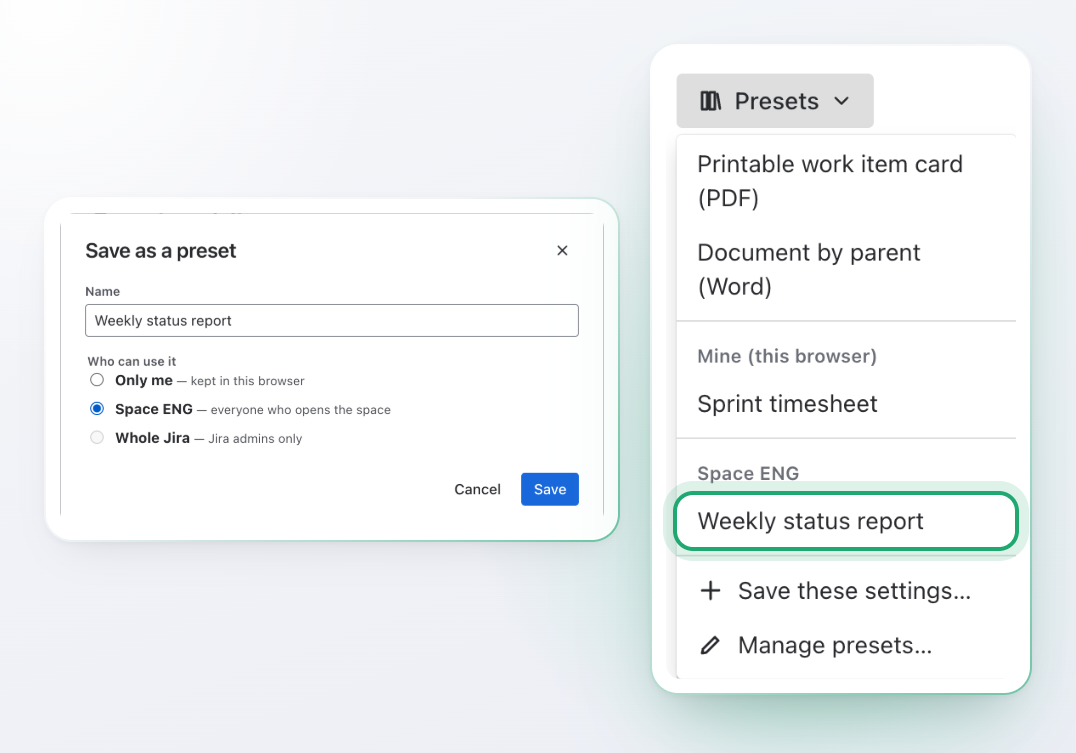
  • Your own presets, kept in your browser
  • Presets for a space, shared with everyone who opens it
The Save as a preset window with the name Weekly status report and Space ENG chosen, and the Presets menu next to it, where Weekly status report is ringed under Space ENG.

Watch a large export arrive

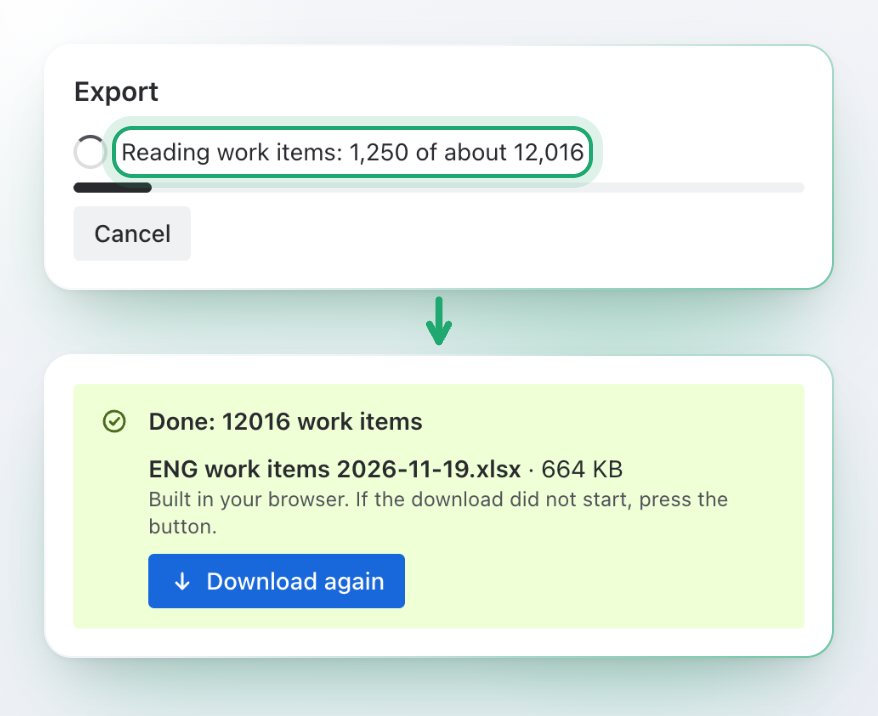
Big export, and no idea if it still runs? Work items are read page by page. You see how far it is, and you can stop at any time.

  • Progress while work items, comments, worklogs and history are read
  • A Cancel button; nothing is saved if you cancel
  • If Jira asks the app to slow down, it waits and carries on
  • One export can hold up to 100,000 work items; we test it with 12,000 in one workbook
An export in progress: Reading work items: 1,250 of about 12,016, a progress bar and a Cancel button. Under it the finished export: Done, 12016 work items, a file name ending in .xlsx and a Download again button.

Export from where you already are

The same screen opens from the places you start an export.

  • Apps, then Export: the whole site
  • Export in the space navigation: the space is already chosen
  • Export this work item in the ••• menu of a work item
  • Export sprint, Export backlog and Export in the sprint, backlog and board menus
  • Follows the Jira theme, light or dark, and fits a phone-width window

Safe to open and share

Work item text can start with an equals sign. The app makes sure that never turns into a formula.

  • Text that starts with =, +, - or @ is stored as text in Excel and marked in CSV
  • The file holds only what you may already see in Jira

Export in four steps

No set-up. Open Export and go.

  1. Pick the work items

    A space, a saved filter or any JQL. Count them first if you like.

  2. Choose the file

    Excel, CSV, PDF or Word, with the options that matter for it.

  3. Set the fields

    Pick and order fields, switch on comments, worklogs or history.

  4. Press Export

    The file is built in your browser and downloads when it is ready.

Built on Forge, no external servers

The file is built in your browser

Will security approve one more app? This one reads work items as you, builds the file in your browser and hands it to you. It stores only presets and templates, never your work items, your exports or people. It is built on Atlassian Forge, sends nothing to any other server, and uses no AI.

Built in your browser

Work items go from Jira to your browser to your file. No copy is made anywhere else.

No external servers

No analytics, no third parties, no outside services.

Jira permissions apply

A file holds only what you may already see in Jira.

Two permissions, each with a reason

Read work items, and app storage for presets and templates. See the docs.

Premium

For teams that already have a report layout and want every export to use it.

Your own Excel templates

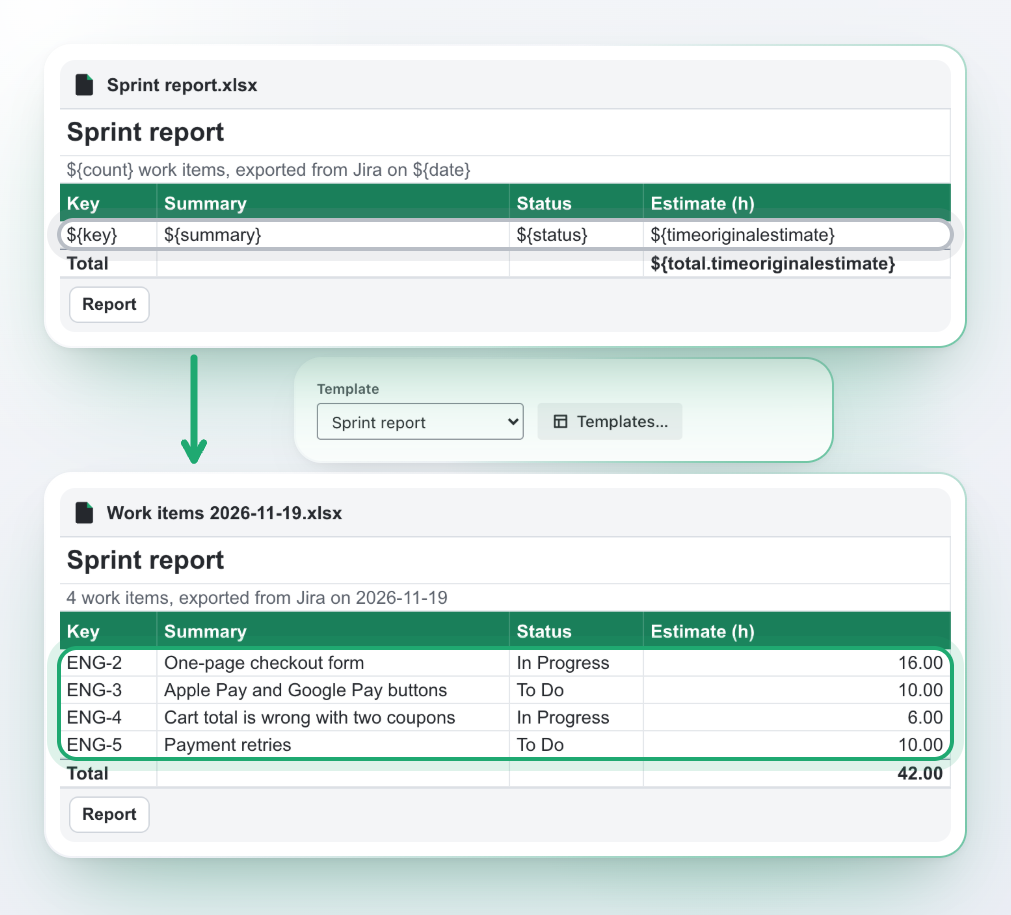
Upload the workbook your company already uses. Put ${summary} where a field goes; a row with a field repeats for every work item.

Your own Word templates

Use your letterhead and layout. Table rows and the paragraphs between ${#items} and ${/items} repeat for every work item.

Presets for the whole Jira

Save a field set and layout once, and every team on the site starts from it.

A workbook named Sprint report with a title, a green header and one row of placeholders such as ${key} and ${summary}. Below it, the Template field of the app with Sprint report chosen, and the exported file: the same layout with four work items in it and a total of 42.00.

Templates are filled in your browser too, so work item data is still not sent to any server. How templates work.

Questions and answers

What can Stepwise Excel & PDF Exporter for Jira export?

Work items from a JQL query, a saved filter, a space, a sprint, the backlog or a single work item, to Excel (XLSX), CSV, PDF and Word (DOCX). Comments, worklogs, history, links and child work items can be included.

Where do I find it?

In Apps → Export, in the Export page of a space, in the ••• menu of a work item (Export this work item), and in the board, backlog and sprint menus. The docs show each place.

How is it better than the export Jira already has?

You get a finished file instead of raw data. The workbook has typed cells, a frozen header, filters, widths and totals; comments, worklogs, history and links get their own sheets; PDF and Word come out as cards and documents; and you choose the fields and their order.

Is it really an Excel file?

Yes, a real XLSX workbook. Numbers, dates and links are typed cells, the header is frozen, filters and widths are set, numeric columns can have a total row, and child work items are grouped by level.

How many work items can I export?

The app reads work items page by page and shows progress. One export can hold up to 100,000 work items, and we test it with 12,000 in one workbook. You can cancel at any time, and if Jira asks for a pause the app waits and continues.

Do PDFs support Cyrillic and other alphabets?

Latin (including extended and Vietnamese), Cyrillic and Greek are built in. Chinese, Japanese, Korean, Arabic and Hebrew are not drawn in PDF; use Excel or Word for those.

Does it handle rich text from descriptions and comments?

Yes. Headings, lists, code blocks, quotes, tables and links in Jira text carry over into PDF and Word, and become plain text in cells.

Can I use my own template?

With Premium you can upload an Excel or Word file with placeholders such as ${summary} and ${status}, and loops over work items. Everything is filled in your browser. See Templates.

Who can see what?

The app reads work items as you, so a file holds only what you may already see in Jira.

Is my data sent anywhere?

No. Work items are read by your browser and the file is built there. The app is built on Forge with no external servers. It stores only presets and templates, never work items, exports or people.

Can it send a file by email or run on a schedule?

No. Exports run when you press the button.

Are spreadsheet formulas in work item text dangerous?

The app makes them harmless: text that starts with =, +, - or @ is stored as text in Excel and marked in CSV.

Does it support dark theme?

Yes, it follows each person’s Jira theme automatically.

Export it ready to send

Open Export, pick the work items and the file, and press the button. No cleanup afterwards.